

When I was young (a long time ago, I sometimes call myself a DBA Dinosaur..) I developed in CPP a Windows Service (I read the MSDN magazine from Microsoft back then) to collect data from SQL Servers. And time went by..
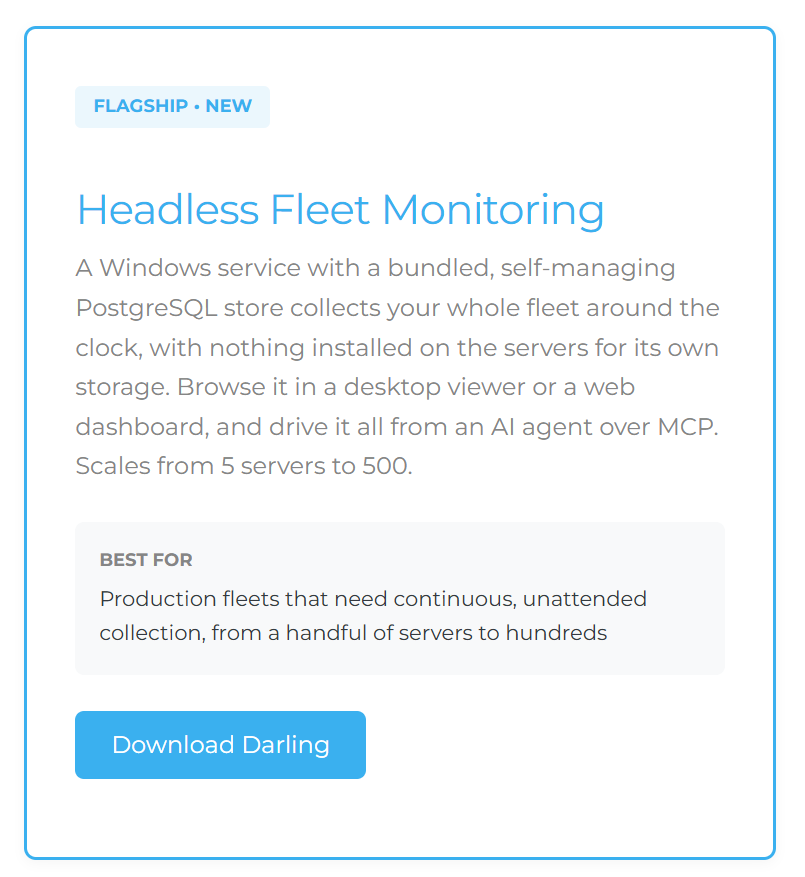
Thanks to Erik Darling ( Free SQL Server Performance Monitoring | Darling Data ) we now have a nice data collector service (lightweight, free, PostgreSQL (so no SQL licensing), web interface, AI/MCP support), made by one of the best SQL Server consultants himself. There is also a Lite version using Duck DB.
So instead of paying big money why not do it yourself and follow these steps I did to get it working!
Deploying PerformanceMonitor Darling to a monitoring VM
2026-09-03Darling 3.6.0Windows Server 2022lab: opendata.local
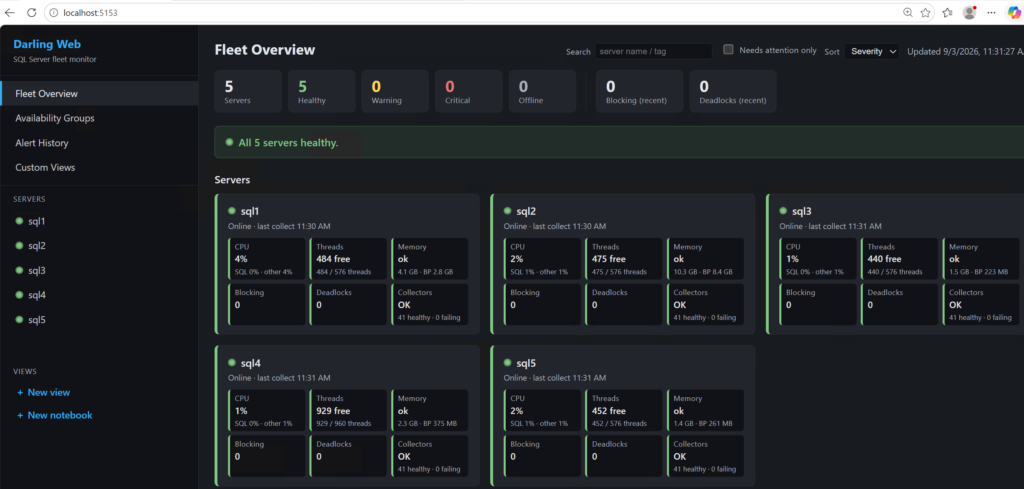
I want always-on performance data for the five SQL Servers in my lab, landing in one central store, with a browser dashboard I can open without keeping a desktop app running. The Darling edition of PerformanceMonitor does exactly that: a 24/7 Windows service that collects into a bundled PostgreSQL + TimescaleDB store, with a read-only web dashboard and an optional WPF viewer on top. Nothing is installed on the monitored servers.
The VM build and domain join are their own story. This picks up from there.
Starting point
MON — Windows Server 2022, 2 vCPU / 8 GB / 80 GB, joined to opendata.local. Two NICs: one on NAT for internet, one on the isolated lab segment at 10.0.0.20 with the domain controller (10.0.0.1) as its only DNS server.
It resolves sql1.opendata.local … sql5 and reaches each on TCP 1433. I’m signed in as a domain admin, working in an elevated PowerShell.
| Host | Role | Address |
|---|---|---|
| DC | Domain controller, DNS | 10.0.0.1 |
| SQL1–SQL3 | SQL Server 2022 | 10.0.0.2–.4 |
| SQL4–SQL5 | SQL Server 2025 | 10.0.0.5–.6 |
| MON | Monitoring VM (this build) | 10.0.0.20 |
Step 01
Install the .NET 10 runtime
Darling 3.6.0 is a framework-dependent build. The service needs the ASP.NET Core Runtime 10 — unconditionally, because the MCP libraries pull the ASP.NET Core framework reference in even if you never enable MCP or the dashboard. The WPF viewer additionally needs the .NET Desktop Runtime 10. A stock Windows Server has neither.
$ProgressPreference = 'SilentlyContinue'
$dl = "$env:USERPROFILE\Downloads"
Invoke-WebRequest "https://aka.ms/dotnet/10.0/aspnetcore-runtime-win-x64.exe"     -OutFile "$dl\aspnetcore10.exe"
Invoke-WebRequest "https://aka.ms/dotnet/10.0/windowsdesktop-runtime-win-x64.exe" -OutFile "$dl\desktop10.exe"
Start-Process "$dl\aspnetcore10.exe" -ArgumentList '/install','/quiet','/norestart' -Wait
Start-Process "$dl\desktop10.exe"    -ArgumentList '/install','/quiet','/norestart' -Wait

& 'C:\Program Files\dotnet\dotnet.exe' --list-runtimes
expected
Microsoft.AspNetCore.App 10.0.11 [C:\Program Files\dotnet\shared\Microsoft.AspNetCore.App]
Microsoft.NETCore.App 10.0.11 [C:\Program Files\dotnet\shared\Microsoft.NETCore.App]
Microsoft.WindowsDesktop.App 10.0.11 [C:\Program Files\dotnet\shared\Microsoft.WindowsDesktop.App]
Step 02
Create the service account
Darling connects to the monitored servers as the account its Windows service runs under. The default virtual service account reaches remote servers as the computer account (OPENDATA\MON$) — I don’t want to grant that. A plain AD service account it is. On the DC:
$pw = Read-Host -AsSecureString "Password for svc-darling"
New-ADUser -Name "svc-darling" -SamAccountName "svc-darling" `
  -UserPrincipalName "svc-darling@opendata.local" `
  -AccountPassword $pw -PasswordNeverExpires $true -CannotChangePassword $true -Enabled $true
Step 03
Download and extract Darling
The README still says “in development, not yet packaged” — that’s stale; there is a proper release. Pull it onto MON, verify the hash against SHA256SUMS.txt from the same release, and extract to a machine-scoped path.
$zip = "$env:USERPROFILE\Downloads\PerformanceMonitorDarling-3.6.0.zip"
Invoke-WebRequest "https://github.com/erikdarlingdata/PerformanceMonitor/releases/download/v3.6.0/PerformanceMonitorDarling-3.6.0.zip" -OutFile $zip

(Get-FileHash $zip -Algorithm SHA256).Hash
 33A9F194E335D34F5D1E58BE03F15AA6EF530EBF401297FF974BB78CCB974161

Expand-Archive -Path $zip -DestinationPath 'C:\PerformanceMonitorDarling' -Force
Why not under a profile
Not C:\Users\…, not a UNC path, not a mapped drive. The service runs as an unprivileged virtual account that is neither you nor an administrator; a user profile grants it nothing, so it installs cleanly and then the bundled PostgreSQL dies at initdb because it can’t read its own files. C:\PerformanceMonitorDarling is the documented location and the installer refuses the bad ones.
The zip is self-contained: the service, pg-runtime.zip (bundled PostgreSQL 18 + TimescaleDB), wwwroot\ (the dashboard), viewer\ (the WPF app), and install-darling.ps1.
Step 04
Write darling.json
One config file next to the service exe. Managed PostgreSQL store, five servers on integrated auth, dashboard on. The one non-obvious key is trustServerCertificate per server: SQL Server 2022+ encrypts by default and my lab servers present self-signed certificates.
{
  "postgres": { "managed": true, "port": 5641, "connectAs": "admin" },
  "servers": [
    { "name": "sql1", "host": "sql1.opendata.local", "auth": "integrated", "trustServerCertificate": true, "excludedDatabases": [] },
    { "name": "sql2", "host": "sql2.opendata.local", "auth": "integrated", "trustServerCertificate": true, "excludedDatabases": [] },
    { "name": "sql3", "host": "sql3.opendata.local", "auth": "integrated", "trustServerCertificate": true, "excludedDatabases": [] },
    { "name": "sql4", "host": "sql4.opendata.local", "auth": "integrated", "trustServerCertificate": true, "excludedDatabases": [] },
    { "name": "sql5", "host": "sql5.opendata.local", "auth": "integrated", "trustServerCertificate": true, "excludedDatabases": [] }
  ],
  "capturePlans": true,
  "alerts":   { "enabled": true },
  "analysis": { "enabled": true, "intervalMinutes": 30 },
  "web": { "enabled": true, "port": 5153 },
  "mcp": { "enabled": false, "port": 5152 }
}
managed: true means the service runs its own bundled PostgreSQL — nothing to install, no database to provision. That is “the Postgres option”: the store is PostgreSQL + TimescaleDB. (Darling can also monitor PostgreSQL servers as targets; here I’m only pointing it at SQL Server.)
Step 05
Grant permissions, then pre-flight
Least-privilege, applied to all five servers from MON via the SqlServer PowerShell module. The grant set is the one from the project’s README: server-state and catalog visibility, the Extended Events sessions, and read access to the Agent job tables in msdb.
Install-Module -Name SqlServer -Force -AllowClobber -Scope AllUsers
Import-Module SqlServer

$acct = 'OPENDATA\svc-darling'
$tsql = @"
USE [master];
IF SUSER_ID(N'$acct') IS NULL CREATE LOGIN [$acct] FROM WINDOWS;
GRANT VIEW SERVER STATE, VIEW ANY DEFINITION, CONNECT ANY DATABASE,
      ALTER ANY EVENT SESSION, ALTER TRACE, ALTER SETTINGS TO [$acct];
GO
USE [msdb];
IF DATABASE_PRINCIPAL_ID(N'$acct') IS NULL CREATE USER [$acct] FOR LOGIN [$acct];
GRANT SELECT ON dbo.sysjobs         TO [$acct];
GRANT SELECT ON dbo.sysjobactivity  TO [$acct];
GRANT SELECT ON dbo.sysjobhistory   TO [$acct];
GRANT SELECT ON dbo.sysjobschedules TO [$acct];
GRANT SELECT ON dbo.syscategories   TO [$acct];
GRANT SELECT ON dbo.syssessions     TO [$acct];
GRANT EXECUTE ON dbo.agent_datetime TO [$acct];
GO
"@

foreach ($s in 'sql1','sql2','sql3','sql4','sql5') {
    Invoke-Sqlcmd -ServerInstance "$s.opendata.local" -Database master -Query $tsql -TrustServerCertificate
    "granted on $s"
}
Then the built-in pre-flight, which validates the config and actually connects to every server:
cd C:\PerformanceMonitorDarling
.\PerformanceMonitor.Darling.Service.exe --test-connection
[PASS] sql1: SQL major version 16, Enterprise, msdb access: yes
[PASS] sql2: SQL major version 16, Enterprise, msdb access: yes
[PASS] sql3: SQL major version 16, Enterprise, msdb access: yes
[PASS] sql4: SQL major version 17, Enterprise, msdb access: yes
[PASS] sql5: SQL major version 17, Enterprise, msdb access: yes
All servers reachable.Before trustServerCertificate
Without that key, the pre-flight gets as far as the login and then fails: The certificate chain was issued by an authority that is not trusted. The TCP connection succeeded — this is the TLS handshake, not the network. Normal for lab servers with self-signed certs.
Step 06
Install the service
Elevated, from the install folder:
.\install-darling.ps1It checks the runtimes and the install location, re-runs the pre-flight, registers the event-log source, creates the PerformanceMonitor Darling service under a virtual account, reconciles firewall rules, starts it, and drops viewer shortcuts. The first start does real work — unpack pg-runtime.zip, initdb, migrate the store, build the TimescaleDB hypertables and continuous aggregates — so give it a couple of minutes.service log — first start
Postgres store ready (schema v104, 103 migration(s) applied)
TimescaleDB detected — hypertables, chunk-based retention, and compression enabled
TimescaleDB: 68/68 collector table(s) are hypertables
PerformanceMonitor Darling collection loop started
Starting web dashboard on http://localhost:5153 (loopback only)
[WARN] [sql4] Connect failed, retrying in 60s: Login failed for user 'OPENDATA\MON$'.
The gotcha
The store built perfectly; every SQL connection fails. The service is still running as its default virtual account, which reaches the monitored servers as the computer account OPENDATA\MON$ — and I granted svc-darling, not MON$. Fixed next.
Step 07
Switch the service to svc-darling
Stop it, change the Log On account in services.msc (that route also grants the account the Log on as a service right), then re-grant the new account on the service’s own files — it locks them down to whatever account it last ran as, including the DPAPI credential blobs for the managed store.
Stop-Service 'PerformanceMonitor Darling'

 services.msc -> PerformanceMonitor Darling -> Log On tab
   -> This account: OPENDATA\svc-darling  (+ password)

$acct = 'OPENDATA\svc-darling'
$pd   = "$env:ProgramData\PerformanceMonitorDarling"

icacls "$pd" /grant "${acct}:(OI)(CI)F"
icacls "C:\PerformanceMonitorDarling\darling.json" /grant "${acct}:F"

Get-ChildItem "$pd" -Filter *.dpapi -Recurse | ForEach-Object {
    takeown /f $_.FullName /a | Out-Null
    icacls  $_.FullName /grant "${acct}:F" | Out-Null
}

Start-Service 'PerformanceMonitor Darling'
Keep svc-darling out of local Administrators — the bundled PostgreSQL refuses to run with administrative privileges. Now the log reads the way it should:service log — collecting
  [sql3] wait_stats            => 79 rows  (sql:3ms, pg:3ms)
  [sql3] cpu_utilization       => 60 rows  (sql:18ms, pg:2ms)
  [sql3] file_io_stats         => 28 rows  (sql:37ms, pg:2ms)
  [sql2] default_trace_events  => 252 rows (sql:163ms, pg:3ms)
  [sql2] job_history           => 501 rows (sql:38ms, pg:6ms)
  [sql4] query_stats           => 19 rows  (sql:80ms, pg:7ms)
Step 08
Open the dashboard
The dashboard was seeded on, so it’s already up on MON — loopback-only and tokenless by default.
Invoke-RestMethod http://localhost:5153/api/ping      status : ok
Start-Process "http://localhost:5153/"
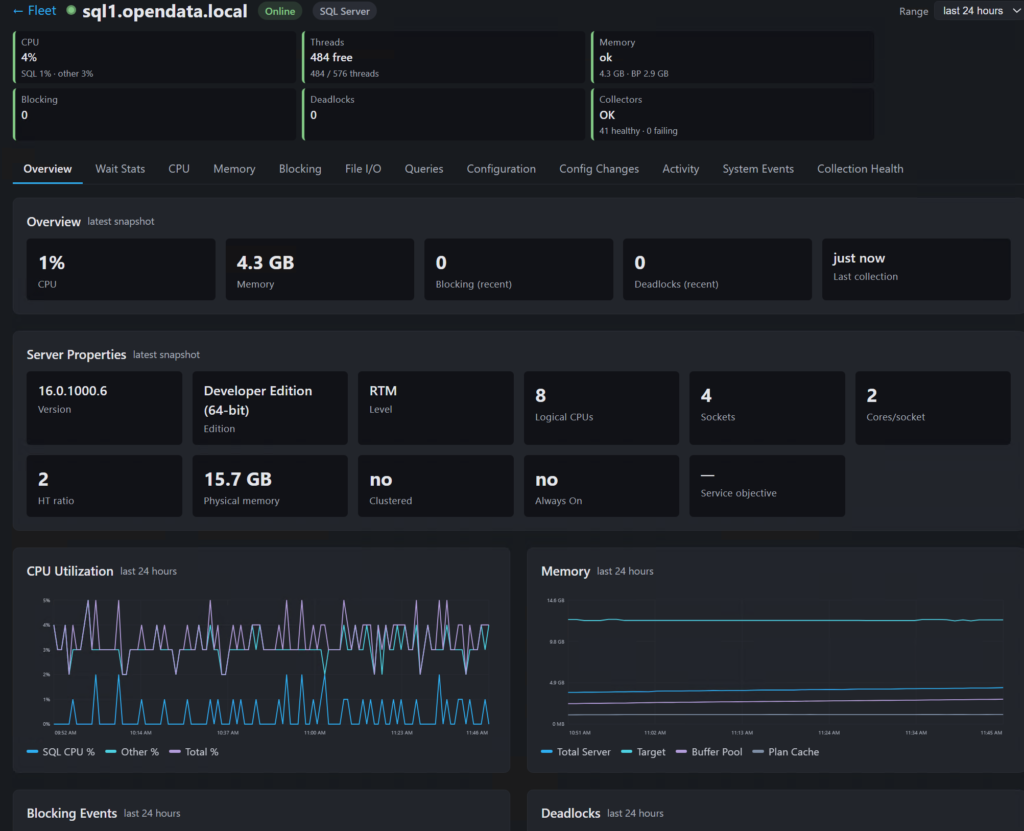
Read-only fleet overview, per-server drill-down (wait stats, CPU, memory, blocking, queries, configuration), alert history, custom views. Exposing it on the LAN is an opt-in --configure-network step that adds a token. For execution plans, blocking chains and deadlock graphs there’s the WPF viewer in viewer\, reading the same store with no SQL credentials of its own. Analysis findings begin after the store holds 24 hours of history per server.
What I’d tell myself before starting
- The Darling service’s identity is its Windows Log On account. Out of the box that’s the machine account for remote servers — switch it to the service account and fix the file ACLs, or every collector logs
Login failed. trustServerCertificate: trueper server for lab SQL Servers with self-signed certs, or the pre-flight dies at the TLS handshake with a message that looks like a network error.- Extract to a machine-scoped path like
C:\PerformanceMonitorDarling. Anywhere under a user profile and the bundled PostgreSQL can’t start. - First service start is slow on purpose —
initdbplus 100-odd migrations. It hasn’t hung; don’t kill it. - The bundled PostgreSQL won’t run elevated, so the service account must stay out of local Administrators.
Mooi