

One query, three versions, and the one rule that explains all of them.
The question sounds simple:
“Show me all bookings that have not been invoiced yet — so no invoice that is already Exported or Printed.”
A first attempt at this query returns too many rows. The obvious “fix” returns too few. Both mistakes are extremely common, and both come from the same misunderstanding: the difference between putting a condition in the ON clause and putting it in the WHERE clause of an outer join.
Let’s rebuild it step by step.
The setup
Three tables: bookings, invoices, and invoice lines that connect a booking to an invoice.
CREATE TABLE dbo.Bookedres    (BResKey int);
CREATE TABLE dbo.Invoices     (InvKey int, InvStatus varchar(20));
CREATE TABLE dbo.InvoiceLines (InvLBResKey int, InvLInvKey int, oms varchar(20));

INSERT dbo.Bookedres    VALUES (10), (20), (30), (40);

INSERT dbo.Invoices     VALUES (111, 'Exported'),
                               (222, 'Printed'),
                               (333, 'To be Printed');

INSERT dbo.InvoiceLines VALUES (10, 111, 'abc'),
                               (10, 111, 'xyz'),
                               (20, 222, 'sde'),
                               (30, 333, 'klm'),
                               (30, 333, 'fer');
The data looks like this:
dbo.Bookedres
| BResKey |
|---|
| 10 |
| 20 |
| 30 |
| 40 |
dbo.Invoices
| InvKey | InvStatus |
|---|---|
| 111 | Exported |
| 222 | Printed |
| 333 | To be Printed |
dbo.InvoiceLines
| InvLBResKey | InvLInvKey | oms |
|---|---|---|
| 10 | 111 | abc |
| 10 | 111 | xyz |
| 20 | 222 | sde |
| 30 | 333 | klm |
| 30 | 333 | fer |
Booking 40 has no invoice lines at all — remember that one, it’s going to be important.
Put together per booking:
| Booking | Invoice | Status | Should it be in the result? |
|---|---|---|---|
| 10 | 111 | Exported | ❌ already invoiced |
| 20 | 222 | Printed | ❌ already invoiced |
| 30 | 333 | To be Printed | ✅ invoice still open |
| 40 | — | no invoice at all | ✅ not invoiced yet |
So the correct answer is booking 30 and booking 40. Keep that in mind.
First, the one thing you need to know
SQL Server doesn’t execute your query top-to-bottom as you read it. Logically, it works in this order:
FROM+JOIN … ON— build the rowsWHERE— throw rows awaySELECT— pick the columns
And for a LEFT JOIN there is one golden rule:
The
ONclause of aLEFT JOINcan never remove a row from the left table. It only decides which right-hand rows match. If nothing matches, the left row stays and the right-hand columns becomeNULL.
Only the WHERE clause can remove rows. Everything below follows from that.
Version 1 — filter in the ON: too many rows
The first attempt puts the “not already invoiced” check in the ON clauses — once as an EXISTS on the invoice lines, and once more on the invoices:
SELECT *
FROM dbo.Bookedres
LEFT JOIN dbo.InvoiceLines c
       ON BResKey = c.InvLBResKey
      AND EXISTS (SELECT 1
                  FROM dbo.Invoices x
                  WHERE x.InvKey = c.InvLInvKey
                    AND x.InvStatus NOT IN ('Exported', 'Printed'))
LEFT JOIN dbo.Invoices d
       ON c.InvLInvKey = d.InvKey
      AND d.InvStatus NOT IN ('Exported', 'Printed');
Result — 5 rows:
| BResKey | InvLInvKey | oms | InvStatus |
|---|---|---|---|
| 10 | NULL | NULL | NULL |
| 20 | NULL | NULL | NULL |
| 30 | 333 | klm | To be Printed |
| 30 | 333 | fer | To be Printed |
| 40 | NULL | NULL | NULL |
Bookings 10 and 20 are still there. Why? For booking 10 the EXISTS is false (its invoice is Exported), so the join to InvoiceLines fails — and a failing LEFT JOIN doesn’t remove the row, it just fills c.* (and therefore d.*) with NULL. The intention was to exclude bookings, but the ON clause can only un-match them.
Notice how misleading the output is: bookings 10 and 20 now look exactly like booking 40 — “no invoice at all” — while in reality they are already invoiced. Nothing in the result tells you the difference.
And the status filter on d? It never does anything: a line only gets through the first join when its invoice is open, so d.InvStatus NOT IN (…) is always true for the rows that reach it. Two filters, zero effect on which bookings come back.
Version 2 — the classic “fix”: too few rows
The natural reaction is: “then move the filter to the WHERE“:
SELECT *
FROM dbo.Bookedres
LEFT JOIN dbo.InvoiceLines c
       ON BResKey = c.InvLBResKey
LEFT JOIN dbo.Invoices d
       ON c.InvLInvKey = d.InvKey
WHERE d.InvStatus NOT IN ('Exported', 'Printed');
Result — 2 rows:
| BResKey | InvLInvKey | oms | InvStatus |
|---|---|---|---|
| 30 | 333 | klm | To be Printed |
| 30 | 333 | fer | To be Printed |
Booking 40 is gone — and it’s exactly the kind of booking we were looking for!
What happened: after the joins, booking 40 has d.InvStatus = NULL. Then the WHERE evaluates
NULL NOT IN ('Exported', 'Printed')
That is not TRUE — it’s UNKNOWN. And WHERE only keeps rows that are TRUE. So every row where the outer join found nothing is thrown away.
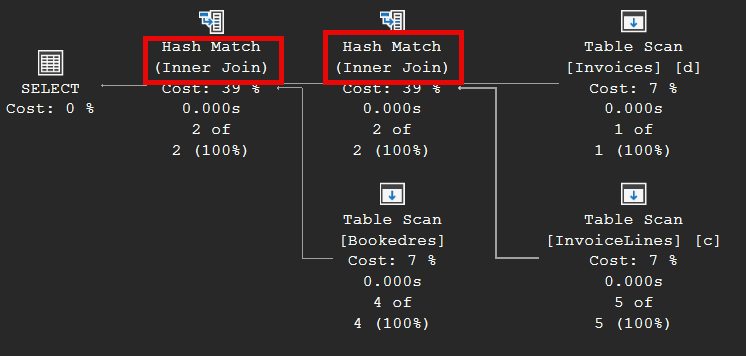
This is the classic outer join filter error: a WHERE condition on a column of the right-hand table silently turns your LEFT JOIN into an INNER JOIN. You wrote LEFT, but you get INNER behaviour. (Tip: look at the actual execution plan — the optimizer often notices this too and simply shows an inner join.)
Version 3 — the correct query
Separate the two jobs:
ON: only connect the tables.WHERE: decide which bookings to drop — the ones that have an Exported/Printed invoice.
SELECT *
FROM dbo.Bookedres
LEFT JOIN dbo.InvoiceLines c
       ON BResKey = c.InvLBResKey
LEFT JOIN dbo.Invoices d
       ON c.InvLInvKey = d.InvKey
WHERE NOT EXISTS (SELECT 1
                  FROM dbo.InvoiceLines c2
                  JOIN dbo.Invoices d2 ON c2.InvLInvKey = d2.InvKey
                  WHERE c2.InvLBResKey = BResKey
                    AND d2.InvStatus IN ('Exported', 'Printed'));
Result — 3 rows, booking 30 and booking 40:
| BResKey | InvLInvKey | oms | InvStatus |
|---|---|---|---|
| 30 | 333 | klm | To be Printed |
| 30 | 333 | fer | To be Printed |
| 40 | NULL | NULL | NULL |
Why this works:
- The
NOT EXISTSis in theWHERE, so it really removes bookings 10 and 20. - It’s a check per booking, not a comparison against a column of the outer-joined table, so a booking without any invoice (40) gives
NOT EXISTS = TRUEand stays. NoNULLtrap.
All three side by side
| Version | Filter placed in | Rows | Bookings | Problem |
|---|---|---|---|---|
| 1 | EXISTS / status in ON | 5 | 10, 20, 30, 30, 40 | Too many — ON can’t remove bookings |
| 2 | InvStatus NOT IN in WHERE | 2 | 30, 30 | Too few — NULL → UNKNOWN, LEFT becomes INNER |
| 3 | NOT EXISTS in WHERE | 3 | 30, 30, 40 | ✅ Correct |
“But booking 30 is there twice?”
That’s not a bug in the filter — booking 30 has two invoice lines (klm and fer), and joining a one-to-many relationship gives you one row per line. If you want one row per booking, don’t join the lines at all; fetch what you need per booking:
SELECT b.BResKey, oi.InvKey, oi.InvStatus
FROM dbo.Bookedres b
OUTER APPLY (SELECT DISTINCT i.InvKey, i.InvStatus
             FROM dbo.InvoiceLines il
             JOIN dbo.Invoices i ON i.InvKey = il.InvLInvKey
             WHERE il.InvLBResKey = b.BResKey) oi
WHERE NOT EXISTS (SELECT 1
                  FROM dbo.InvoiceLines c2
                  JOIN dbo.Invoices d2 ON c2.InvLInvKey = d2.InvKey
                  WHERE c2.InvLBResKey = b.BResKey
                    AND d2.InvStatus IN ('Exported', 'Printed'));
Result — one row per booking:
| BResKey | InvKey | InvStatus |
|---|---|---|
| 30 | 333 | To be Printed |
| 40 | NULL | NULL |
“Too many rows” has two possible causes, and it pays to ask which one you’re looking at: a filter in the wrong place, or a one-to-many join doing exactly what you told it to.
Cheat sheet
ONin aLEFT JOIN= “which right-hand rows match?” It never removes left rows.WHERE= “which result rows survive?” It’s the only place that removes rows.- A
WHEREcondition on a right-hand column turnsLEFT JOINintoINNER JOIN— unless you explicitly allow theNULL(… OR d.InvKey IS NULL). - “Exclude X if something exists elsewhere” →
WHERE NOT EXISTS (…). It reads like the business question and has noNULLsurprises. - Duplicate rows? First check your join cardinality (one-to-many), before you reach for
DISTINCT. - Give subquery tables their own aliases (
c2,d2). Reusingcanddinside the subquery is legal — the inner alias hides the outer one — but it makes the query very hard to read and review.
The quick test for any outer join you write: add a row on the left side that has no match at all (like booking 40). If it disappears from your result, you have the classic error.