

Blocking and Locking is used by the database engine to make sure the data is reported
back to you correctly, and never use WITH(NOLOCK) queries in production.
Why? there is a change you report values incorrectly (data moves between pages or there are rollbacks or data could even be deleted).
SQL Server locks on several levels at once (database, table, page, row) and in different modes. Escalation replaces many row or page locks with one table lock.
1. What gets locked (granularity)
| Resource | What | Typical use |
|---|---|---|
| KEY | A row in an index (clustered or nonclustered) | Normal reads and writes on indexed tables |
| RID | A row in a heap (table without a clustered index) | Same, for heaps |
| PAGE | An 8 KB data or index page | Intent locks, or page-level locking |
| HOBT | A heap or index (partition) | Escalation target with LOCK_ESCALATION = AUTO |
| OBJECT | The whole table | Intent locks, and the escalation target |
| DATABASE | The database | Every connection holds S (the DATABASE S rows you saw) |
| Other | EXTENT, FILE, ALLOCATION_UNIT, METADATA, APPLICATION | Internal, or sp_getapplock |
Locks form a hierarchy. Before SQL Server takes a lock on a row, it takes an intent lock on the page and the table. Your demo showed this exactly: KEY S on the rows, PAGE IS on the pages, OBJECT IS on the table.
2. Lock modes
| Mode | Name | Taken by |
|---|---|---|
| S | Shared | Reads (not under RCSI or Snapshot) |
| U | Update | UPDATE/DELETE while finding rows; converts to X. Prevents the classic conversion deadlock |
| X | Exclusive | INSERT, UPDATE, DELETE. Always held until the end of the transaction |
| IS / IX / IU | Intent shared / exclusive / update | On higher levels: “there are S / X / U locks below” |
| SIX | Shared with intent exclusive | Reads the whole table and changes some rows |
| Sch-S | Schema stability | Every query: “don’t change the table while I use it” |
| Sch-M | Schema modification | DDL, index rebuild (offline), ALTER TABLE. Blocks everything |
| BU | Bulk update | BULK INSERT / bcp with TABLOCK |
| RangeS-S, RangeS-U, RangeI-N, RangeX-X | Key-range | SERIALIZABLE only: lock the gaps between keys to stop phantom rows |
3. Compatibility (can both be granted at the same time?)
| Requested ↓ / Held → | IS | S | U | IX | SIX | X |
|---|---|---|---|---|---|---|
| IS | ✅ | ✅ | ✅ | ✅ | ✅ | ❌ |
| S | ✅ | ✅ | ✅ | ❌ | ❌ | ❌ |
| U | ✅ | ✅ | ❌ | ❌ | ❌ | ❌ |
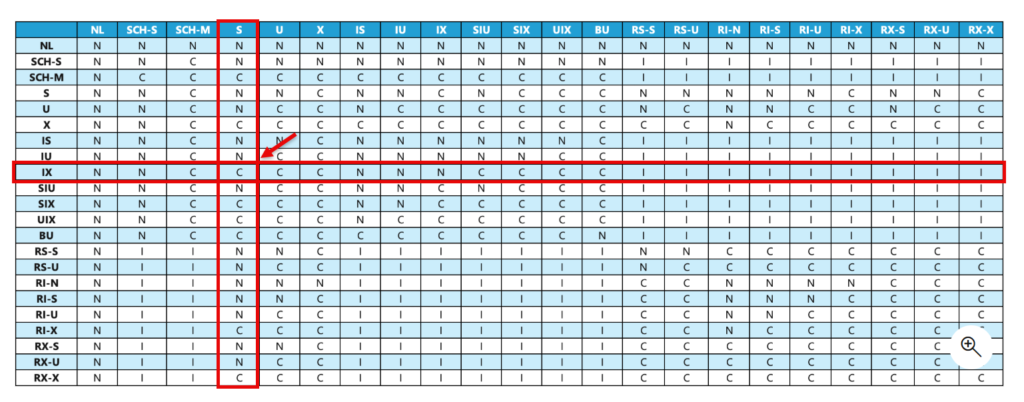
| IX | ✅ | ❌ | ❌ | ✅ | ❌ | ❌ |
| SIX | ✅ | ❌ | ❌ | ❌ | ❌ | ❌ |
| X | ❌ | ❌ | ❌ | ❌ | ❌ | ❌ |
Sch-Sis compatible with everything exceptSch-M, andSch-Mis compatible with nothing. That’s why an offline index rebuild blocks every query.- The row that matters for your case is S vs IX: ❌. The escalated
OBJECT Slock blocks the INSERT’sOBJECT IXlock. - Without escalation,
IS(the SELECT) andIX(the INSERT) are compatible, which is why the 2,999-row version didn’t block.
4. How long S locks are held, per isolation level
| Isolation level | S locks on rows read |
|---|---|
| READ UNCOMMITTED | None (Sch-S only) |
| READ COMMITTED | Released right after the row is read, except in cases like the two we found (prefetch, LOB + Sort) |
| REPEATABLE READ | Until the end of the transaction |
| SERIALIZABLE | Until the end of the transaction, plus key-range locks |
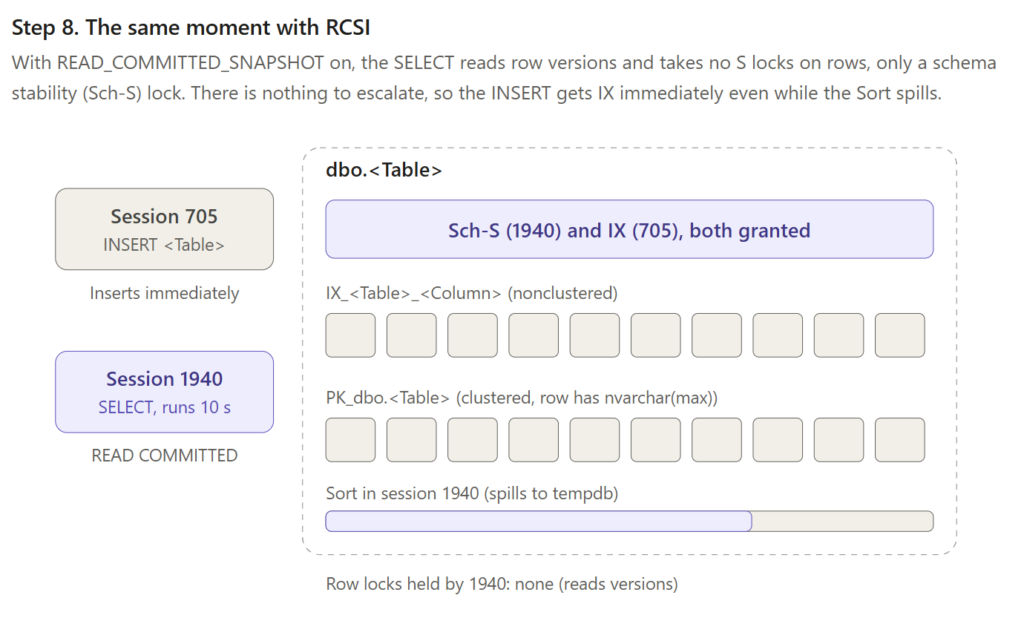
| RCSI / SNAPSHOT | None: readers use row versions |
X locks are always held until the end of the transaction, whatever the isolation level.
5. Escalation rules
What gets escalated
- Row (KEY/RID) or page locks are replaced by one table lock. SQL Server never escalates from row to page.
- With
LOCK_ESCALATION = AUTOon a partitioned table, it escalates to the partition (HOBT) instead. - The mode follows the work: reads escalate to S, modifications to X. An X table lock also blocks all readers (except under RCSI or Snapshot).
- After escalation, the row and page locks are released. That’s why your locks XML only showed
OBJECT S.
When it’s triggered
- Lock count: one statement holds about 5,000 locks on a single table or index. It’s counted per index, not per table. Your V7 had 2,999 + 2,999 locks on two indexes and did not escalate.
- Lock memory: the memory used by locks grows past a fixed share of SQL Server’s memory. The XE event then shows a memory cause instead of
Lock threshold.
When it fails
- Escalation never waits. If another session holds an incompatible lock on the table (for example an INSERT with
IX), the attempt fails and the statement continues with its row locks. - SQL Server tries again every 1,250 additional locks. That’s why your counts were 6,249 and 6,251 instead of exactly 5,000.
Lock partitioning
On servers with 16 or more logical CPUs, table-level locks are taken once per lock partition. That’s why you saw OBJECT S with request_count = 32. It’s still one logical lock.
6. Controlling escalation
| Option | Effect | Caution |
|---|---|---|
ALTER TABLE … SET (LOCK_ESCALATION = TABLE) | Default | |
… = AUTO | Escalate to the partition on partitioned tables | Can cause deadlocks between partitions |
… = DISABLE | No escalation for that table (in most cases) | More lock memory; memory pressure can still force escalation |
| Trace flag 1224 | Turns off count-based escalation for the whole server; memory-based escalation still works | Server-wide |
| Trace flag 1211 | Turns off all escalation | Can run out of lock memory (error 1204) |
ROWLOCK / PAGLOCK hints | Choose the starting granularity | Don’t prevent escalation |
TABLOCK hint | Takes the table lock immediately | |
Batching (e.g. DELETE TOP (4000) in a loop) | Stays under the threshold | The usual fix for large modifications |
7. Monitoring
- Extended Events
lock_escalation: which statement, which index, how many locks, and the cause. This is the event session from the simulation. sys.dm_db_index_operational_stats:index_lock_promotion_attempt_countandindex_lock_promotion_countper index. Counters reset when the server restarts.sys.dm_tran_locks: live locks, as in the query you ran.
8. SQL Server 2025: optimized locking
SQL Server 2025 (your WIN10 version) and Azure SQL have optimized locking. It requires Accelerated Database Recovery, and works best together with RCSI:
- Modifications: rows no longer keep X locks until the end of the transaction. Instead, one lock on the transaction ID is held.
- Lock after qualification: rows are checked against the WHERE clause before they’re locked.
- Result: far fewer locks, so far less escalation.
It’s worth a separate test in LockDemo later. It would show directly how many fewer locks the INSERT and UPDATE variants take.
Test and use RSCI if possible, or investigate what gets locked and blocked.
Using sp_WhoIsActive ( amachanic/sp_whoisactive: sp_whoisactive ) is a good start to find the one cause blocking and the ones waiting.
EXEC dbo.sp_WhoIsActive
     @find_block_leaders  = 1,
     @get_locks           = 1,
     @get_additional_info = 1,   -- transaction_isolation_level
     @get_plans           = 1;   -- plan of the blocker
EXEC dbo.sp_WhoIsActive
@find_block_leaders = 1,
@get_locks = 1,
@get_outer_command = 1;Two ways to find locks
a) via extended events
b) configure a job and use sp_WhoIsActive
So this script is a combination from the setup (step by step) and the analyses from Erik (Senior Xml Parser).
/*=========================================================================
    BlockWatch - capture the blocked process report to a DBA table via Agent

    Author:   Ronald.de.Groot@OpenData.nl
    Source:   https://github.com/ronaldgithub/tsql-mysteries/blob/main/BlockWatch_sp_HumanEvents_setup.sql
    License:  MIT

    Drafted with the help of Claude Code (Anthropic), thanks Claude, I am such a bad keyboard typer!(?)

    Section 8 calls sp_HumanEventsBlockViewer from Erik Darling's DarlingData
    toolkit - https://github.com/erikdarlingdata/DarlingData (MIT licensed).
    Used url: https://github.com/erikdarlingdata/DarlingData/tree/main/sp_HumanEvents
    That procedure is a separate install and is NOT included here; grab it via
    his Install-All script so you get updates.

    Tested on: SQL Server 2025
==========================================================================*/
/*========================================================================
    BlockWatch - capture the blocked process report to a DBA table via Agent
   -----------------------------------------------------------------------
    Consistent naming used throughout:

        blocked process threshold .... server setting that MUST be > 0
        BlockWatch ................... the Extended Events session
        BlockWatch*.xel ............. the event_file target (SQL Server LOG folder)
        DBA.dbo.BlockWatch .......... destination table for the raw reports
        DBA.dbo.BlockWatch_Collect .. proc that shreds the .xel into the table
        DBA.dbo.BlockWatch_Demo ..... throwaway table used only for the test
        "DBA - BlockWatch Collect" .. the SQL Server Agent job

    Run sections 1-5 once, in order
    Section 6 is a manual two-window test.
    Sections 7-9 are verification, analysis, and cleanup.
=========================================================================*/Step 1 – Can we go?
/*-------------------------------------------------------------------------
    SECTION 1 : Server configuration
    The blocked process report is produced by the engine only when a task has
    been blocked for longer than this many SECONDS. It is NOT part of the XE
    session - if it stays 0, the session captures nothing. 5 is the minimum
    that actually works.
------------------------------------------------------------------------*/
EXEC sys.sp_configure 'show advanced options', 1;
RECONFIGURE;
EXEC sys.sp_configure 'blocked process threshold', 5;   /* seconds */
RECONFIGURE;
GO
/* verify: value_in_use must be 5, not 0 */
SELECT name, value_in_use
FROM   sys.configurations
WHERE  name = 'blocked process threshold (s)';
GOStep 2 – Extented Event
/*-------------------------------------------------------------------------
    SECTION 2 : Extended Events session
    filename = N'BlockWatch' writes files named BlockWatch_0_<number>.xel into
    the default SQL Server LOG directory. The search pattern in the collector
    proc (BlockWatch*.xel) must share that prefix.
-------------------------------------------------------------------------*/
IF EXISTS (SELECT 1 FROM sys.server_event_sessions WHERE name = N'BlockWatch')
    DROP EVENT SESSION BlockWatch ON SERVER;
GO
CREATE EVENT SESSION BlockWatch ON SERVER
ADD EVENT sqlserver.blocked_process_report
ADD TARGET package0.event_file
(
    SET filename          = N'BlockWatch',
        max_file_size     = 64,   /* MB per file */
        max_rollover_files = 5
)
WITH
(
    MAX_MEMORY           = 4096 KB,
    EVENT_RETENTION_MODE = ALLOW_SINGLE_EVENT_LOSS,
    MAX_DISPATCH_LATENCY = 5 SECONDS,
    STARTUP_STATE        = ON      /* survives a SQL Server restart */
);
GO
ALTER EVENT SESSION BlockWatch ON SERVER STATE = START;
GO
/* verify: is_running must be 1 */
SELECT
    s.name,
    is_running = IIF(r.create_time IS NULL, 0, 1),
    r.create_time
FROM       sys.server_event_sessions AS s
LEFT JOIN  sys.dm_xe_sessions        AS r ON r.name = s.name
WHERE      s.name = N'BlockWatch';
GOStep 3 Database objects
/*------------------------------------------------------------------------
    SECTION 3 : DBA database, destination table, collector proc
------------------------------------------------------------------------*/
IF DB_ID(N'DBA') IS NULL
    CREATE DATABASE DBA;
GO
USE DBA;
GO
/* destination table for the raw reports */
DROP TABLE IF EXISTS dbo.BlockWatch;
GO
CREATE TABLE dbo.BlockWatch
(
    BlockWatchID     bigint IDENTITY(1,1) CONSTRAINT PK_BlockWatch PRIMARY KEY,
    event_time_utc   datetime2(3)  NOT NULL,   /* from the event; already UTC */
    event_xml        xml           NOT NULL,   /* the full blocked_process_report event */
    event_hash       AS CONVERT(binary(32),
                          HASHBYTES('SHA2_256', CONVERT(nvarchar(max), event_xml))) PERSISTED,
    collected_at_utc datetime2(3)  NOT NULL
        CONSTRAINT DF_BlockWatch_collected DEFAULT (SYSUTCDATETIME())
);
GO
/* IGNORE_DUP_KEY lets the proc re-read the whole .xel every run without
   creating duplicates - only genuinely new events get inserted */
CREATE UNIQUE INDEX UQ_BlockWatch
    ON dbo.BlockWatch (event_time_utc, event_hash)
    WITH (IGNORE_DUP_KEY = ON);
GO
CREATE OR ALTER PROCEDURE dbo.BlockWatch_Collect
AS
BEGIN
    SET NOCOUNT ON;
    /* sys.fn_xe_file_target_read_file needs VIEW SERVER STATE (or sysadmin).
       If the Agent job step fails, that permission is usually why - see Section 5. */
    INSERT dbo.BlockWatch (event_time_utc, event_xml)
    SELECT
        x.event_xml.value('(event/@timestamp)[1]', 'datetime2(3)'),
        x.event_xml
    FROM
    (
        SELECT event_xml = CONVERT(xml, f.event_data)
        FROM   sys.fn_xe_file_target_read_file(N'BlockWatch*.xel', NULL, NULL, NULL) AS f
    ) AS x
    WHERE x.event_xml.value('(event/@name)[1]', 'sysname') = N'blocked_process_report';
END;
GOStep 4 & 5 – Job
/*-------------------------------------------------------------------------
    SECTION 4 : SQL Server Agent job
    Owner = sa means the T-SQL step runs in the context of the SQL Server Agent
    service account, which normally already has VIEW SERVER STATE.
-------------------------------------------------------------------------*/
USE msdb;
GO
IF EXISTS (SELECT 1 FROM msdb.dbo.sysjobs WHERE name = N'DBA - BlockWatch Collect')
    EXEC msdb.dbo.sp_delete_job @job_name = N'DBA - BlockWatch Collect';
GO
EXEC msdb.dbo.sp_add_job
    @job_name         = N'DBA - BlockWatch Collect',
    @owner_login_name = N'sa',
    @description      = N'Shreds BlockWatch*.xel into DBA.dbo.BlockWatch';
EXEC msdb.dbo.sp_add_jobstep
    @job_name       = N'DBA - BlockWatch Collect',
    @step_name      = N'Collect',
    @subsystem      = N'TSQL',
    @database_name  = N'DBA',
    @command        = N'EXEC dbo.BlockWatch_Collect;',
    @retry_attempts = 2,
    @retry_interval = 1;
EXEC msdb.dbo.sp_add_jobschedule
    @job_name             = N'DBA - BlockWatch Collect',
    @name                 = N'Every 1 minutes',
    @freq_type            = 4,   /* daily   */
    @freq_interval        = 1,
    @freq_subday_type     = 4,   /* minutes */
    @freq_subday_interval = 1;  -- RDG 1 minute
EXEC msdb.dbo.sp_add_jobserver
    @job_name = N'DBA - BlockWatch Collect';
GO
/*-------------------------------------------------------------------------
    SECTION 5 : (only if the job step fails with a permissions error)
    Grant VIEW SERVER STATE to whatever account the step runs as. Find the
    SQL Server Agent service account in Configuration Manager, then:
-------------------------------------------------------------------------*/
-- GRANT VIEW SERVER STATE TO [DOMAIN\SqlAgentServiceAccount];
GO
Step 6 – Create a blocking simulation (2 separate sessions)
/*========================================================================
    SECTION 6 : Blocking simulation  --  RUN THIS IN TWO SEPARATE WINDOWS
=========================================================================*/
/* --- one-time setup: throwaway test table --------------------------- */
USE DBA;
GO
DROP TABLE IF EXISTS dbo.BlockWatch_Demo;
CREATE TABLE dbo.BlockWatch_Demo (id int PRIMARY KEY, col int);
INSERT dbo.BlockWatch_Demo (id, col) VALUES (1, 100);
GO
/* --- WINDOW 1 : the blocker ------------------------------------------- */
/* Run these three lines, then STOP and switch to Window 2.                   */
/*
USE DBA;
BEGIN TRANSACTION;
UPDATE dbo.BlockWatch_Demo SET col = 999 WHERE id = 1;
*/
/* --- WINDOW 2 : the victim --------------------------------------------
   Run this - it will hang. Leave it hanging ~20 seconds so the engine emits
   3-4 blocked_process_report events (one per 5s threshold interval).
*/
/*
USE DBA;
UPDATE dbo.BlockWatch_Demo SET col = 1 WHERE id = 1;
*/
/* --- WINDOW 1 : release ----------------------------------------------- */
/*
ROLLBACK;
*/Step 7 – Verification
/*==============================================================================
    SECTION 7 : Verification
==============================================================================*/
/* 7a. Did the events reach the .xel target?
       If this returns rows, capture works and the problem (if any) is downstream.
       If it returns nothing, go back to Section 1 (threshold) / Section 2. */
SELECT
    event_time_utc = CONVERT(xml, f.event_data).value('(event/@timestamp)[1]', 'datetime2(3)'),
    event_xml      = CONVERT(xml, f.event_data)
FROM   sys.fn_xe_file_target_read_file(N'BlockWatch*.xel', NULL, NULL, NULL) AS f
WHERE  CONVERT(xml, f.event_data).value('(event/@name)[1]', 'sysname') = N'blocked_process_report'
ORDER BY event_time_utc DESC;
GO
/* 7b. Run the collector by hand - rows must land here before the job matters */
EXEC DBA.dbo.BlockWatch_Collect;
SELECT * FROM DBA.dbo.BlockWatch ORDER BY event_time_utc DESC;
GO
/* 7c. Run the Agent job and read its outcome (run_status 1 = success) */
EXEC msdb.dbo.sp_start_job N'DBA - BlockWatch Collect';
WAITFOR DELAY '00:00:05';
SELECT TOP (10)
    j.name,
    h.step_id,
    h.step_name,
    h.run_status,
    h.message
FROM       msdb.dbo.sysjobhistory AS h
JOIN       msdb.dbo.sysjobs       AS j ON j.job_id = h.job_id
WHERE      j.name = N'DBA - BlockWatch Collect'
ORDER BY   h.run_date DESC, h.run_time DESC;
SELECT rows_in_table = COUNT(*) FROM DBA.dbo.BlockWatch;
GOStep 8 – The readable output
/*=========================================================================
    SECTION 8 : Analyse the collected data with sp_HumanEventsBlockViewer
    Passing @target_table + @target_column switches it into "table mode" -
    it reads the report XML from your table instead of from the .xel files.
    @timestamp_column must be a UTC column (event_time_utc is UTC).
==========================================================================*/
EXEC master.dbo.sp_HumanEventsBlockViewer
    @target_type      = N'table',
    @target_database  = N'DBA',
    @target_schema    = N'dbo',
    @target_table     = N'BlockWatch',
    @target_column    = N'event_xml',
    @timestamp_column = N'event_time_utc',
    @start_date       = '20260831', -- verjaardag van Sophie!
    @end_date         = '20260901';
GO


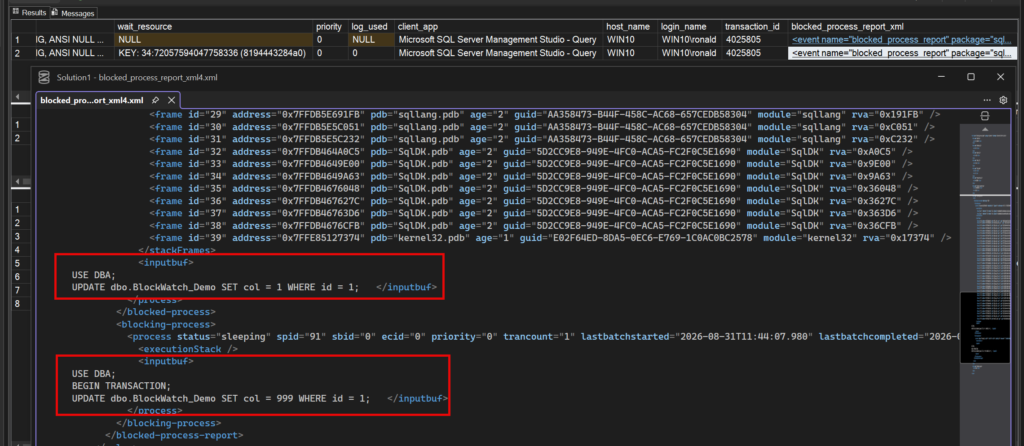
Step 9 – Retention period
/*=========================================================================
    SECTION 9 : Retention  --  add as a second job step, or its own job
=========================================================================*/
DELETE TOP (50000) FROM DBA.dbo.BlockWatch
WHERE event_time_utc < DATEADD(DAY, -90, SYSUTCDATETIME());
GO
Step 10 – Cleaning up when done
/*=========================================================================
    SECTION 10 : Teardown (commented out - uncomment to remove everything)
==========================================================================*/
/*
EXEC msdb.dbo.sp_delete_job @job_name = N'DBA - BlockWatch Collect';
ALTER EVENT SESSION BlockWatch ON SERVER STATE = STOP;
DROP EVENT SESSION BlockWatch ON SERVER;
DROP TABLE IF EXISTS DBA.dbo.BlockWatch;
DROP TABLE IF EXISTS DBA.dbo.BlockWatch_Demo;
DROP PROCEDURE IF EXISTS DBA.dbo.BlockWatch_Collect;
EXEC sys.sp_configure 'blocked process threshold', 0;
RECONFIGURE;
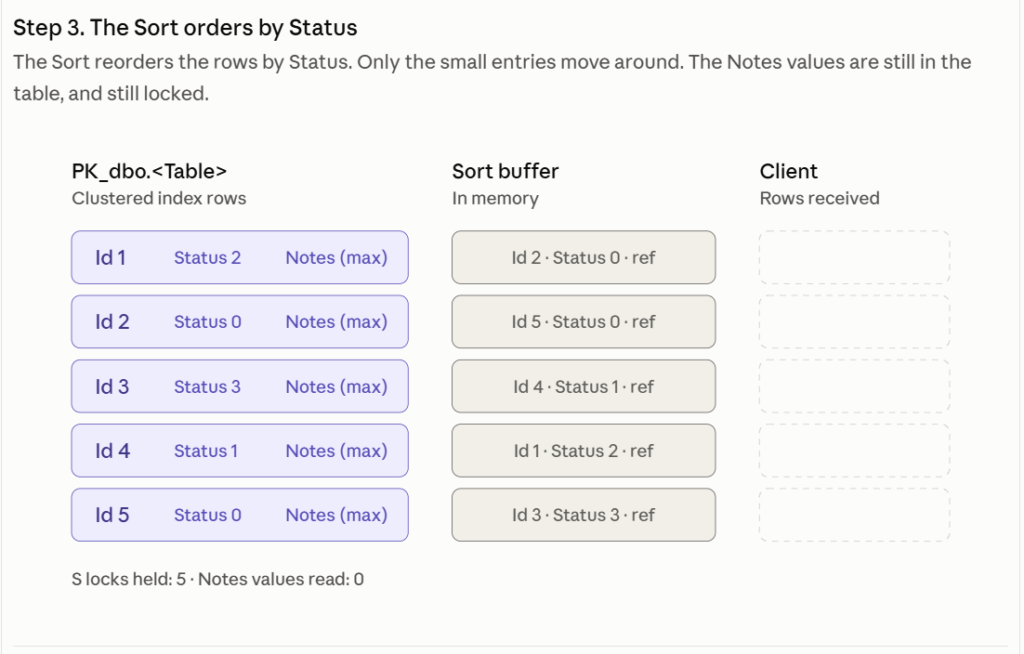
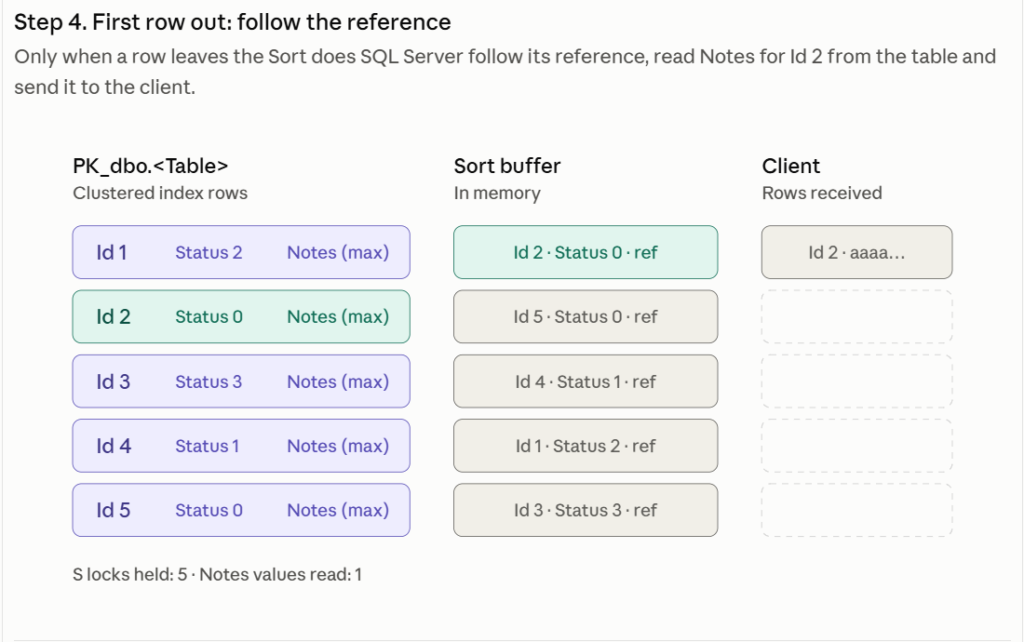
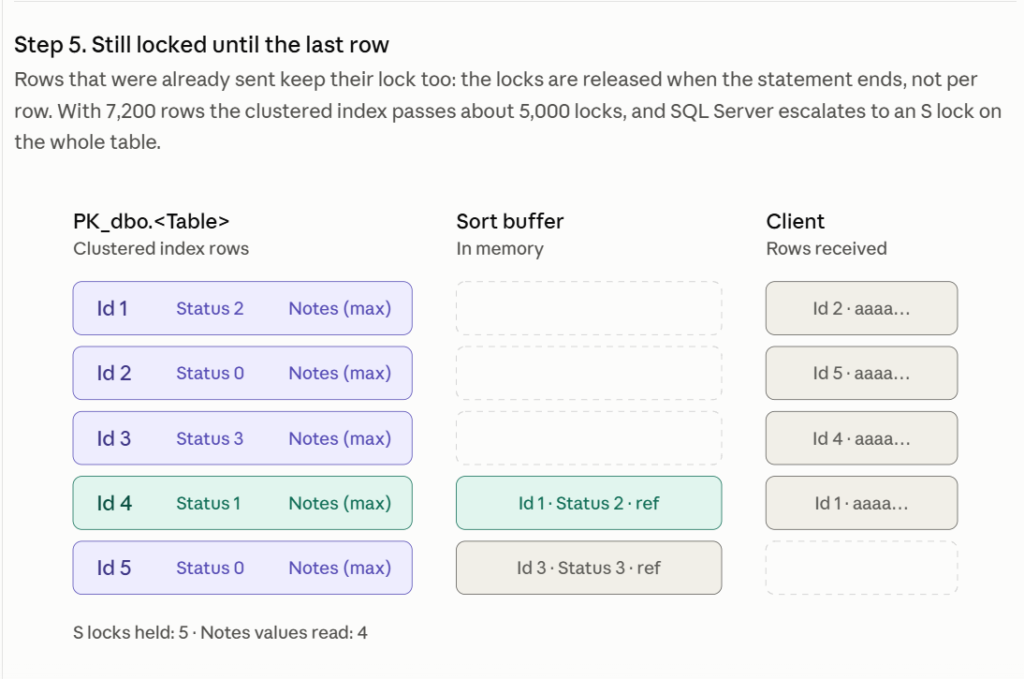
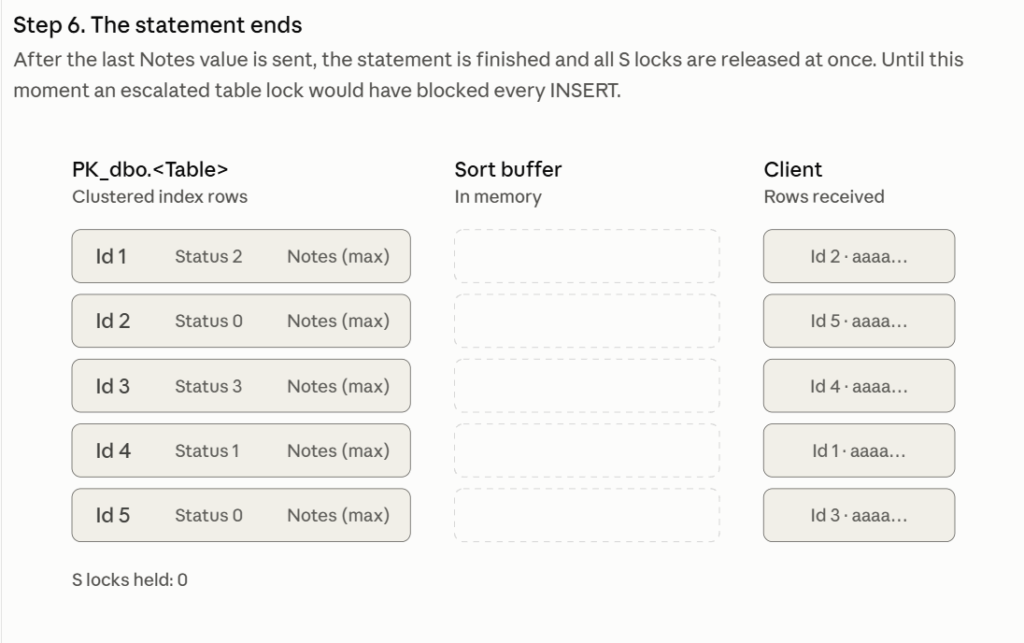
*/In time, an example, how lock escalation can happen, keep your datatypes lean and mean.
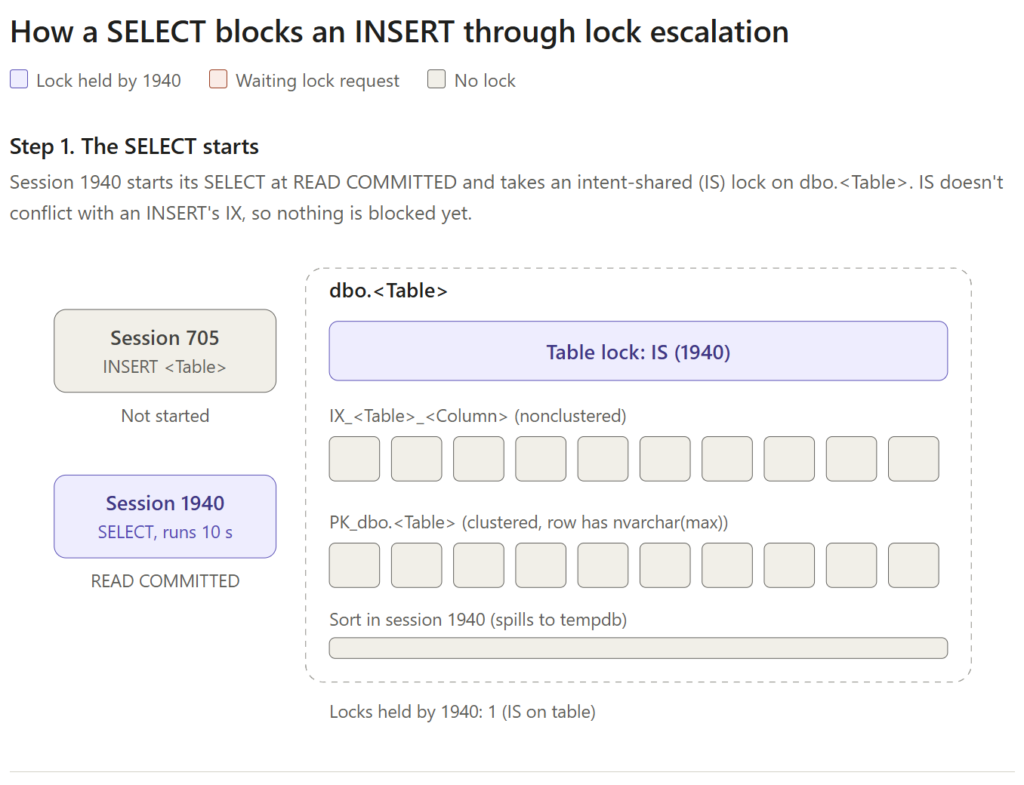
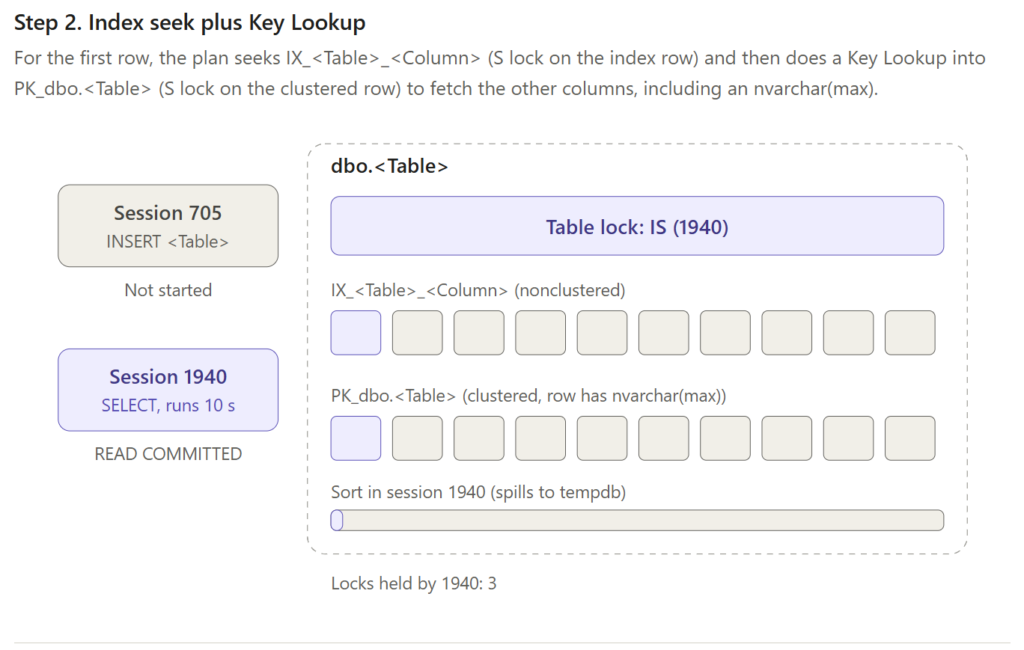
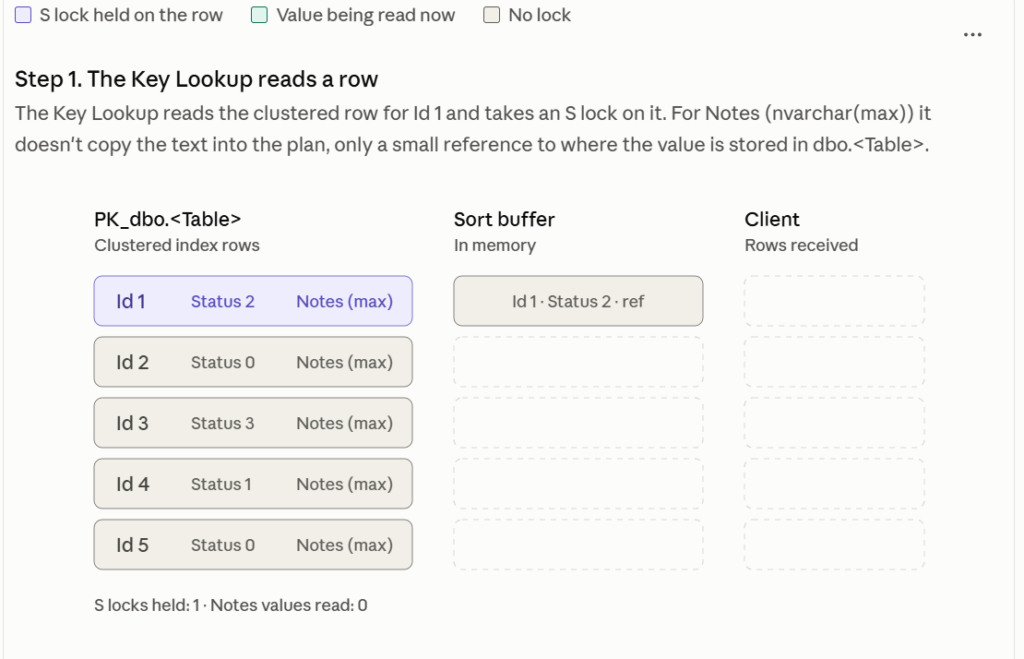
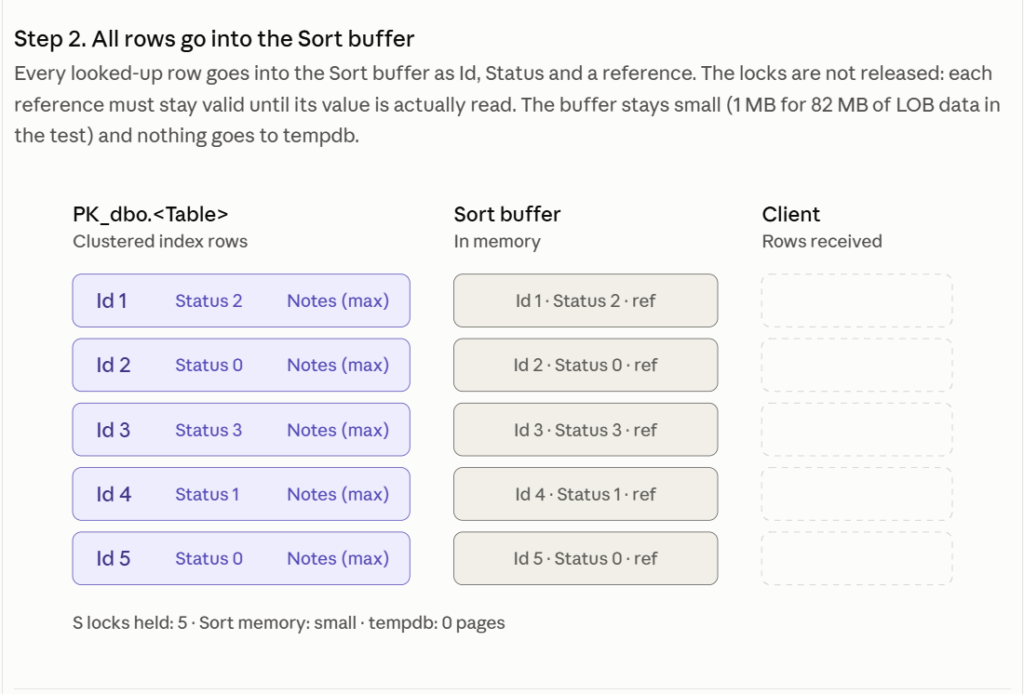
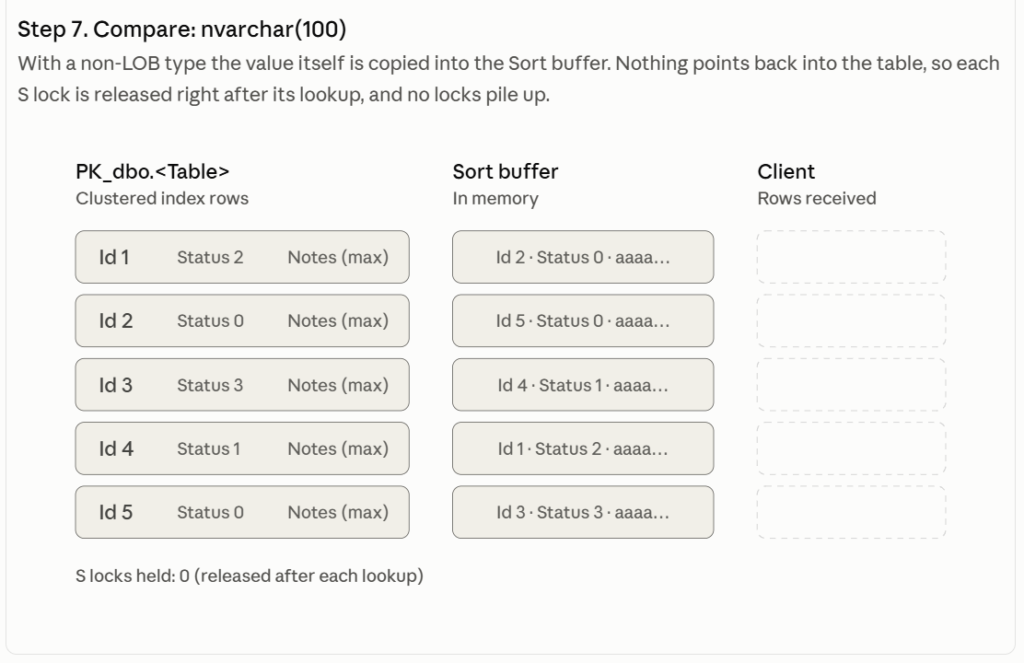
In the Key Lookup (down on this page) is the Sort of the small ref pointer explained.
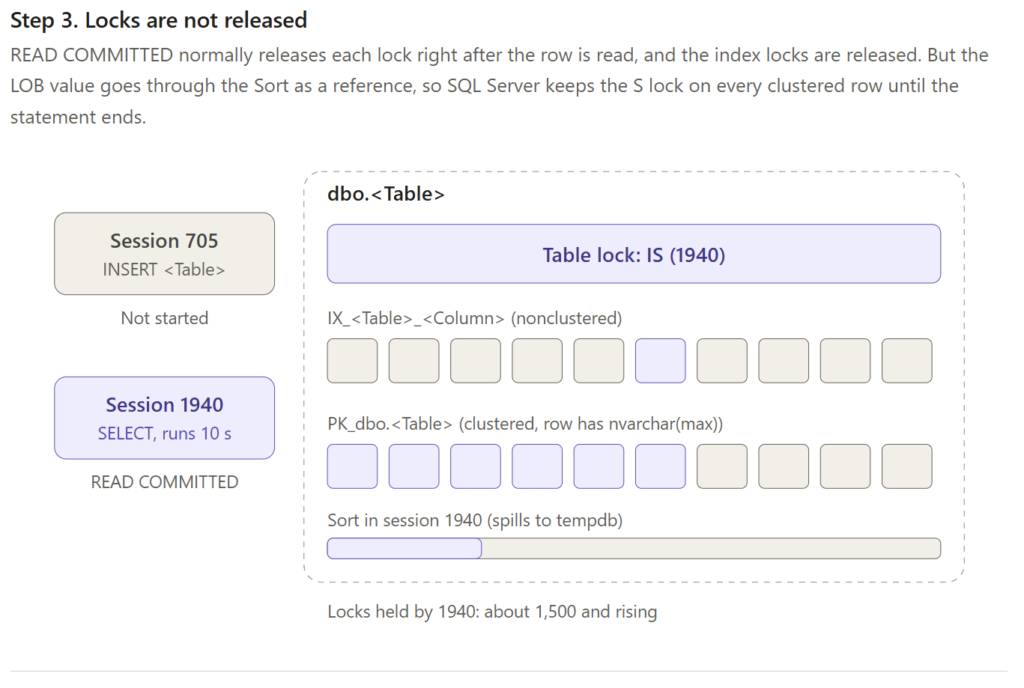
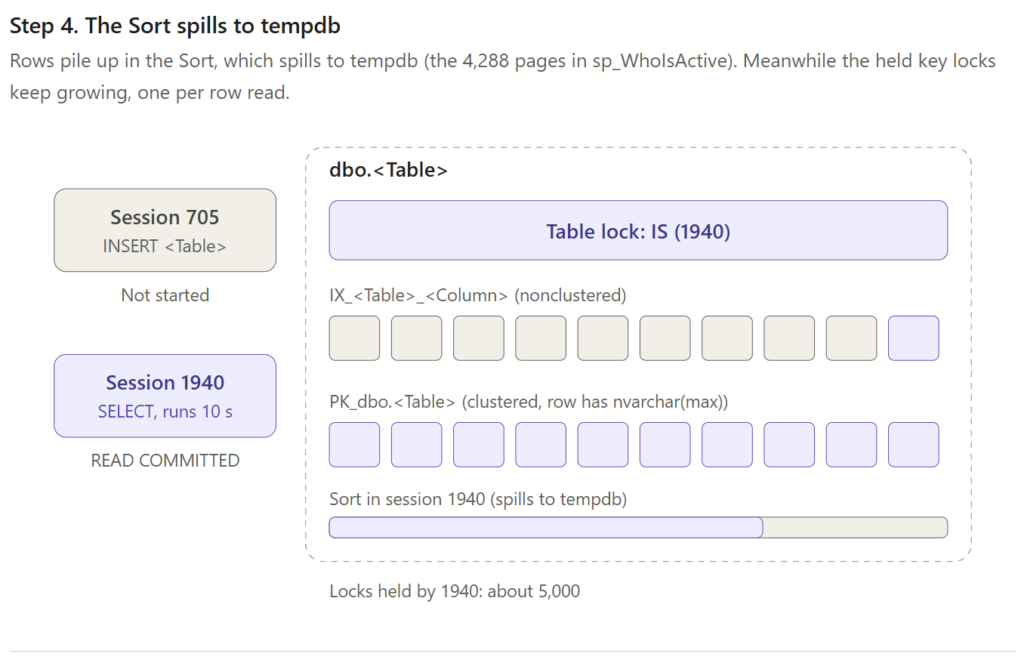
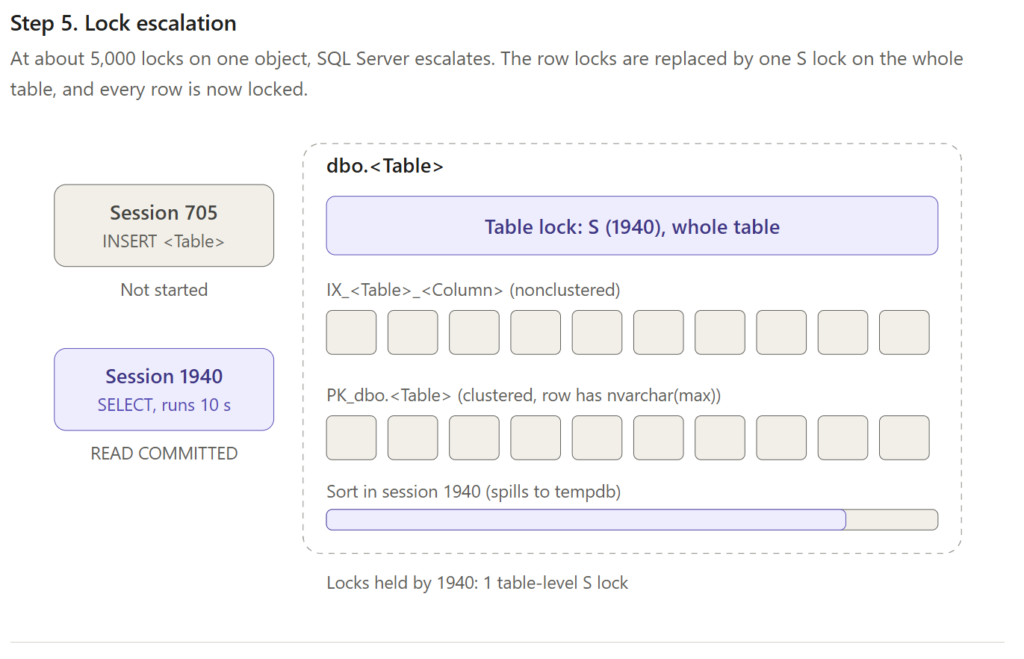
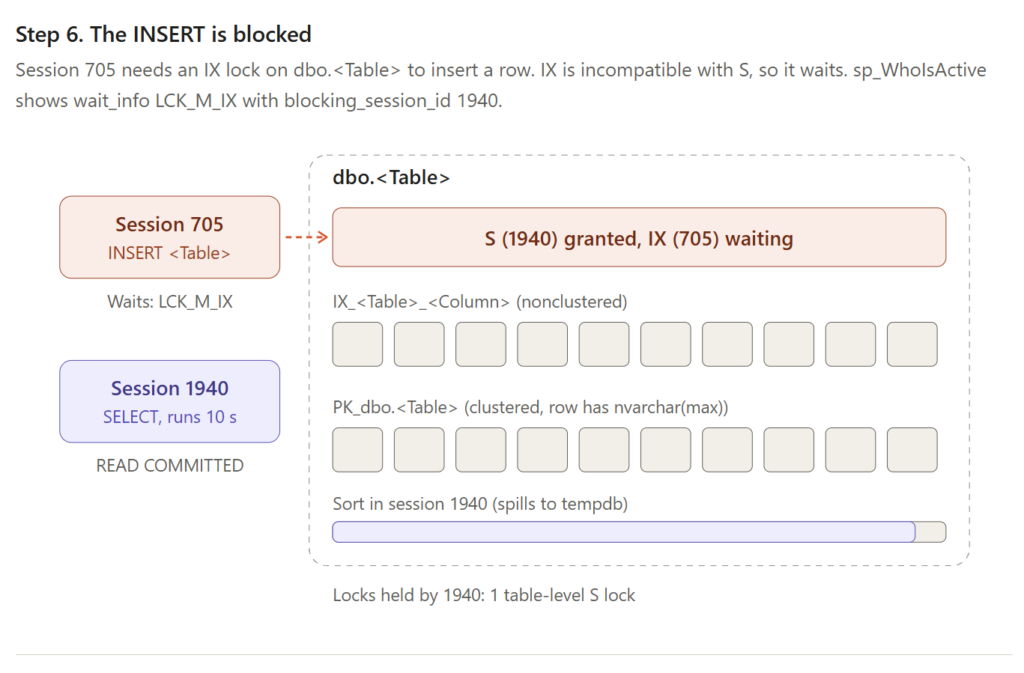
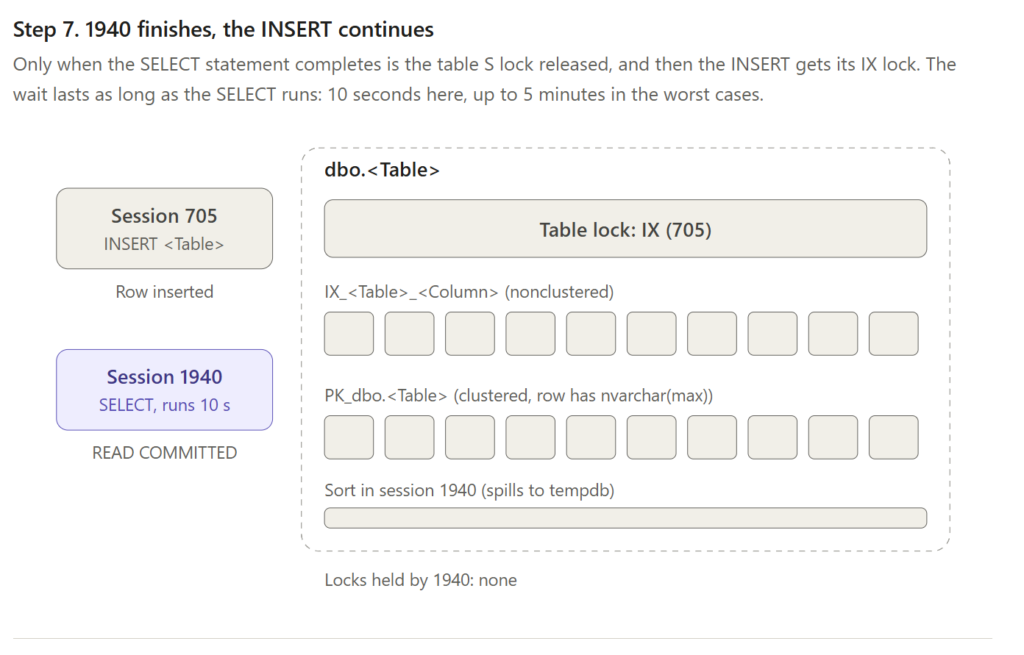
How a Key Lookup is done and the table has LOBs.
Mode B – SQL Agent
/*
    SQL Agent job: capture blocking with sp_WhoIsActive

    Every 15 seconds the job checks for lock waits longer than 5 seconds.
    Only then does it run sp_WhoIsActive (block leaders, locks, isolation
    level, plans) and save the result in DBA.dbo.WhoIsActive_Blocking.
    Without blocking the job runs one cheap query.

    BEFORE RUNNING - check these names (search for "CHANGE"):
      - DBA       database for the log table
      - master    database where sp_WhoIsActive is installed

    The script is safe to run twice: it creates nothing that already exists.
*/


/* =====================================================================
   PART 1  Log table (columns generated by sp_WhoIsActive itself)
   ===================================================================== */
USE master;   -- CHANGE: database where sp_WhoIsActive is installed
GO
IF OBJECT_ID(N'DBA.dbo.WhoIsActive_Blocking') IS NULL   -- CHANGE: log table
BEGIN
    DECLARE @schema nvarchar(max);

    -- Parameters must be identical to the ones in the job step
    EXEC dbo.sp_WhoIsActive
         @find_block_leaders  = 1,
         @get_locks           = 1,
         @get_additional_info = 1,
         @get_plans           = 1,
         @return_schema       = 1,
         @schema              = @schema OUTPUT;

    SET @schema = REPLACE(@schema, '<table_name>', N'DBA.dbo.WhoIsActive_Blocking');   -- CHANGE: log table
    EXEC (@schema);

    PRINT 'Created table DBA.dbo.WhoIsActive_Blocking';
END
ELSE
    PRINT 'Table DBA.dbo.WhoIsActive_Blocking already exists - skipped';
GO


/* =====================================================================
   PART 2  SQL Agent job, step and schedule (every 15 seconds)
   ===================================================================== */
USE msdb;
GO
IF EXISTS (SELECT 1 FROM msdb.dbo.sysjobs WHERE name = N'DBA - Capture blocking (sp_WhoIsActive)')
BEGIN
    PRINT 'Job "DBA - Capture blocking (sp_WhoIsActive)" already exists - skipped';
END
ELSE
BEGIN
    EXEC msdb.dbo.sp_add_job
         @job_name    = N'DBA - Capture blocking (sp_WhoIsActive)',
         @enabled     = 1,
         @description = N'Every 15 s: when a lock wait > 5 s exists, log sp_WhoIsActive (block leaders, locks, additional info, plans) to DBA.dbo.WhoIsActive_Blocking.';

    EXEC msdb.dbo.sp_add_jobstep
         @job_name      = N'DBA - Capture blocking (sp_WhoIsActive)',
         @step_name     = N'Capture when blocked > 5 s',
         @subsystem     = N'TSQL',
         @database_name = N'master',   -- CHANGE: database where sp_WhoIsActive is installed
         @command       = N'
IF EXISTS (
    SELECT 1
    FROM   sys.dm_os_waiting_tasks
    WHERE  wait_type LIKE N''LCK[_]M[_]%''
      AND  wait_duration_ms > 5000          -- blocked longer than 5 s
)
BEGIN
    EXEC dbo.sp_WhoIsActive
         @find_block_leaders  = 1,
         @get_locks           = 1,
         @get_additional_info = 1,
         @get_plans           = 1,
         @destination_table   = ''DBA.dbo.WhoIsActive_Blocking'';   -- CHANGE: log table
END;',
         @on_success_action = 1,   -- quit with success
         @on_fail_action    = 2;   -- quit with failure

    EXEC msdb.dbo.sp_add_schedule
         @schedule_name        = N'Every 15 seconds',
         @enabled              = 1,
         @freq_type            = 4,        -- daily
         @freq_interval        = 1,
         @freq_subday_type     = 2,        -- seconds
         @freq_subday_interval = 15,
         @active_start_time    = 000000,
         @active_end_time      = 235959;

    EXEC msdb.dbo.sp_attach_schedule
         @job_name      = N'DBA - Capture blocking (sp_WhoIsActive)',
         @schedule_name = N'Every 15 seconds';

    EXEC msdb.dbo.sp_add_jobserver
         @job_name    = N'DBA - Capture blocking (sp_WhoIsActive)',
         @server_name = N'(local)';

    PRINT 'Created job "DBA - Capture blocking (sp_WhoIsActive)"';
END
GO


/* =====================================================================
   PART 3  Analysis: head blockers (run whenever you want)
   ===================================================================== */
/*
SELECT collection_time,
       session_id,
       blocked_session_count,
       login_name,
       program_name,
       sql_text,
       additional_info,   -- transaction_isolation_level
       locks,             -- OBJECT S GRANT on the table = lock escalation
       query_plan         -- Nested Loops: WithOrderedPrefetch / WithUnorderedPrefetch?
                          -- Key Lookup: nvarchar(max) in Output List + Sort?
FROM   DBA.dbo.WhoIsActive_Blocking
WHERE  blocked_session_count > 0
  AND  blocking_session_id IS NULL        -- head of the chain
ORDER BY collection_time DESC;
*/


/* =====================================================================
   PART 4  Disable the job when you have enough captures
   ===================================================================== */
/*
EXEC msdb.dbo.sp_update_job
     @job_name = N'DBA - Capture blocking (sp_WhoIsActive)',
     @enabled  = 0;
*/
Script can be found here tsql-mysteries/BlockWatch_sp_HumanEvents_setup.sql at main · ronaldgithub/tsql-mysteries