

Scans and Seeks are the iterators that SQL Server uses to read data from tables and indexes. These iterators are among the most fundamental ones that we support. They appear in nearly every query plan.
What is the difference between a scan and a seek?
A scan returns the entire table or index.
A seek efficiently returns rows from one or more ranges of an index based on a predicate. For example, consider the following query:
select OrderDate
from dbo.Orders
where OrderID = 10257;  <-seek predicate>
Scan
With a scan, we read each row in the orders table, evaluate the predicate “where OrderId = 10257” and, if the predicate is true (i.e., if the row qualifies), return the row. In this case, we refer to the predicate as a “residual” (overgebleven, resterend) predicate. To maximize performance, whenever possible we evaluate the residual predicate in the scan.
However, if the predicate is too expensive, we may evaluate it in a separate filter iterator. The residual predicate appears in text showplan with the WHERE keyword or in XML showplan with the <Predicate> tag.
Here is the text showplan (slightly edited for brevity) for this query using a scan:
|–Table Scan(OBJECT:([ORDERS]), WHERE:([ORDERKEY]=(10257)))
select OrderDate
from dbo.Orders
where EmployeeID = 2;
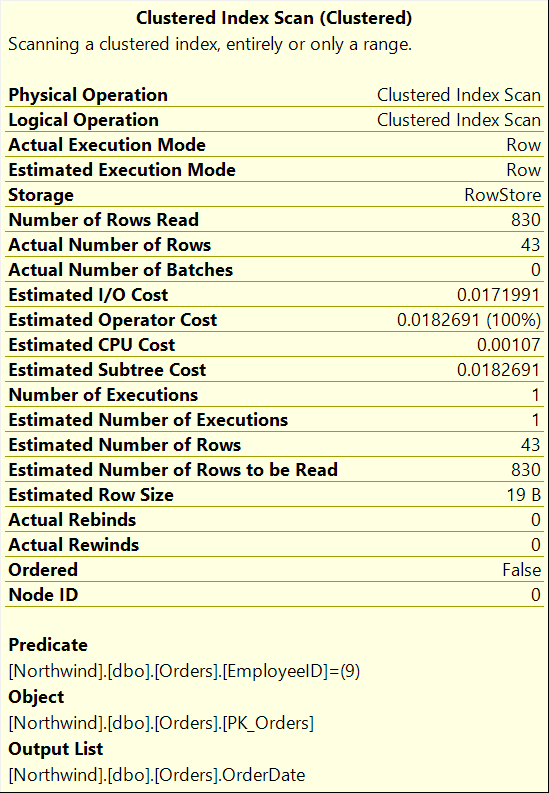
The following figure illustrates the scan:
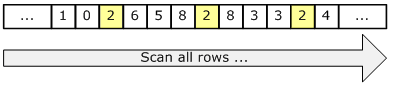
Since a scan touches every row in the table whether or not it qualifies, the cost is proportional to the total number of rows in the table. Thus, a scan is an efficient strategy if
- the table is small;
- or if most of the rows qualify for the predicate.
However, if the table is large and if most of the rows do not qualify, we touch many more pages and rows and perform many more I/O’s than is necessary.
Seek
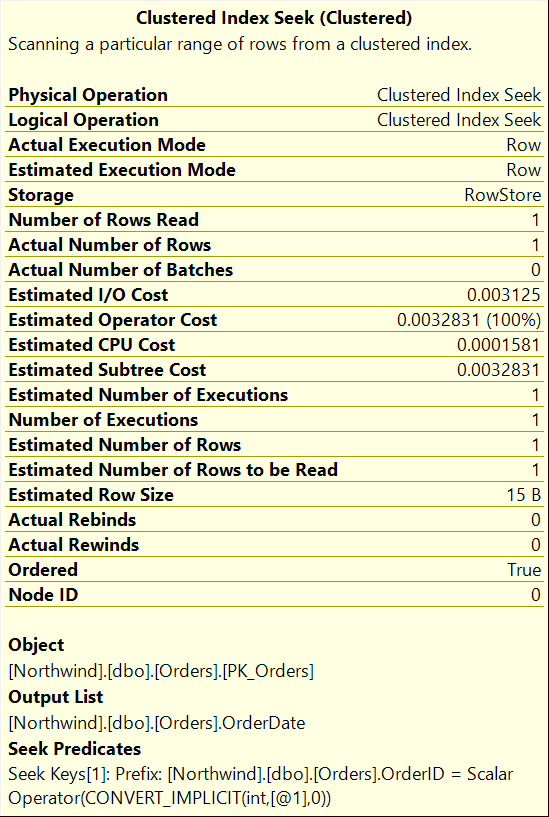
Going back to the example, if we have an index on OrderId, a seek may be a better plan. With a seek, we use the index to navigate directly to those rows that satisfy the predicate. In this case, we refer to the predicate as a “seek” predicate. In most cases, we do not need to re-evaluate the seek predicate as a residual predicate; the index ensures that the seek only returns rows that qualify. The seek predicate appears in the text showplan with the SEEK keyword or in XML showplan with the <SeekPredicates> tag.
Here is the text showplan for the same query using a seek:
|–Index Seek(OBJECT:([ORDERS].[OKEY_IDX]), SEEK:([ORDERKEY]=(2)) ORDERED FORWARD)
The following figure illustrates the seek:
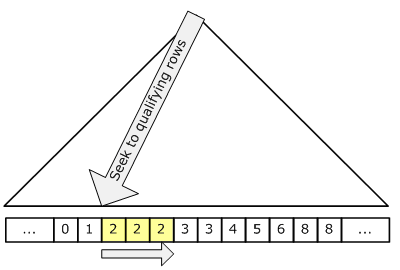
Since a seek only touches rows that qualify and pages that contain these qualifying rows, the cost is proportional to the number of qualifying rows and pages rather than to the total number of rows in the table. Thus, a seek is generally a more efficient strategy if:
- we have a highly selective seek predicate; that is, if we have a seek predicate that eliminates a large fraction of the table.
A note about showplan
In showplan, we distinguish between scans and seeks as well as between scans on heaps (an object with no index), clustered indexes, and non-clustered indexes. The following table shows all of the valid combinations:
| Scan | Seek | |
| Heap | Table Scan | |
| Clustered Index | Clustered Index Scan | Clustered Index Seek |
| Non-clustered Index | Index Scan | Index Seek |
There is much more to write about scans and seeks. In my next post, I will continue by discussing bookmark lookup and how bookmark lookup relates to scans and seeks.
Balancing CPU and I/O throughput is essential to achieve good overall performance and to maximize hardware.
Scan indicates reading the whole of the index/table looking for matches – the time this takes is proportional to the size of the index. Seek, on the other hand, indicates b-tree structure of the index to seek directly to matching records – time taken is only proportional to the number of matching records.
You could query sys.dm_db_index_usage_stats or use Brent Ozars sp_BlitzIndex (sp_BlitzIndex® – SQL Server’s Index Sanity Test). As a consultant looking for Missing Indexes just do not just create them (in production). You need business- and workload knowledge before creating them. Also make sure a table is not ‘over-indexed’ a maximum of about 7(+ or – 2) indexes should be sufficient. A data versus index ratio should be 75% data versus 25% indexes. If you do not have a clue try a columns store index if that is an option. Erik Darling has a nice free script ( sp_IndexCleanup | Darling Data ) to check columns duplicates in data in indexes and if they are perhaps mergeable.