

Part 4 of my series on Craig Freedman’s SQL Server query-processing blog (part 3, August 2006, is here). September 2006 is aggregation month: how GROUP BY, DISTINCT and the aggregate functions actually execute, plus a closer look at scalar subqueries and the Assert operator. Summaries in my own words, and all of it still valid on current SQL Server versions.
All plan screenshots in this post are my own, made in SSMS with “Include Actual Execution Plan” (Ctrl+M). Want to follow along? Run this one-time setup in a scratch database (the examples later use GENERATE_SERIES, so SQL Server 2022 or later) — the cleanup is at the bottom of the post. Yes, dbo.t starts out empty: for scalar aggregates that is exactly the interesting case.
-- One-time setup for the examples in this post
CREATE TABLE dbo.t (a INT, b INT, c INT);
CREATE TABLE dbo.S1 (a INT, b INT);
CREATE TABLE dbo.S2 (a INT, b INT);16. Aggregation (September 6, 2006)
The series opener sticks to scalar aggregates: aggregate functions without a GROUP BY, which always return exactly one row. These are always computed by a Stream Aggregate — and Craig points out a fun bit of trivia: a scalar stream aggregate is about the only non-leaf operator that produces an output row from an empty input. Some aggregates are composites under the hood: AVG is computed as a SUM plus a COUNT with a divide-by-zero guard, and even plain SUM carries a hidden count so it can return NULL instead of 0 when there are no rows.
All three shapes on the empty table — note the Stream Aggregate returning 1 row from 0 input rows in every plan. COUNT(*) gets a Compute Scalar to convert its internal bigint to int, MIN/MAX need no conversion, and AVG’s Compute Scalar is the SUM-divided-by-COUNT with the divide-by-zero guard:
SELECT COUNT(*)        FROM dbo.t;
SELECT MIN(a), MAX(b)  FROM dbo.t;
SELECT AVG(a)          FROM dbo.t;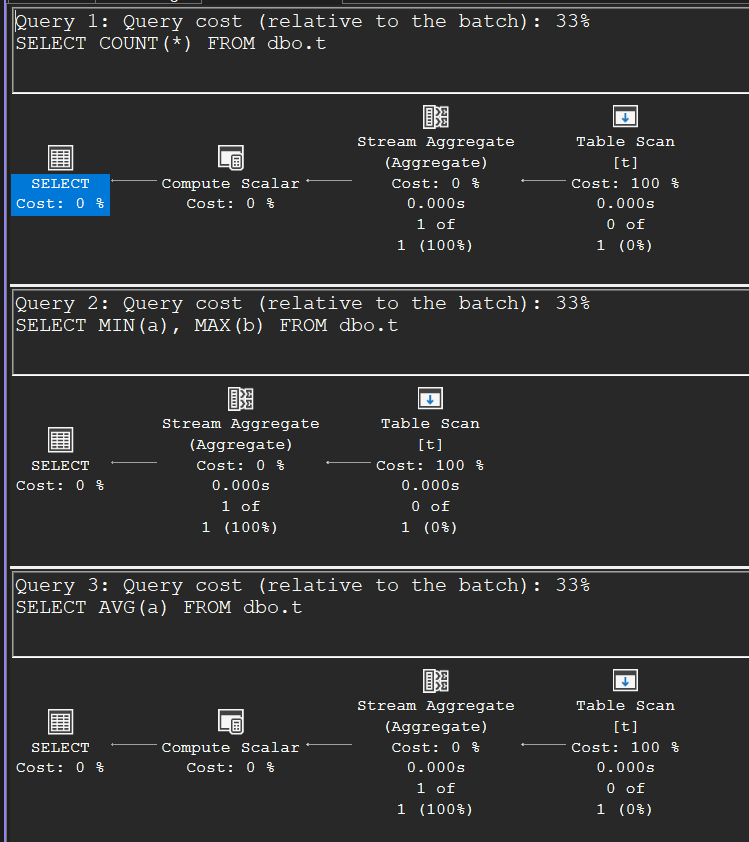
DISTINCT aggregates add a duplicate-elimination step (typically a Sort Distinct), with sensible exceptions: MIN and MAX ignore the DISTINCT keyword because duplicates can’t change the answer, and a unique index makes the dedup step unnecessary. The clever part is multiple DISTINCTs on different columns: those can’t share one pass over the data, so the plan computes each aggregate in its own branch and glues the one-row results together with a cross join.
One DISTINCT versus two, side by side. The single COUNT(DISTINCT a) is a Sort (Distinct Sort) feeding the aggregate; add a second DISTINCT on another column and the plan splits into two complete sort-and-aggregate branches, glued together by a Nested Loops cross join of their one-row results:
SELECT COUNT(DISTINCT a) FROM dbo.t;
SELECT COUNT(DISTINCT a), COUNT(DISTINCT b) FROM dbo.t;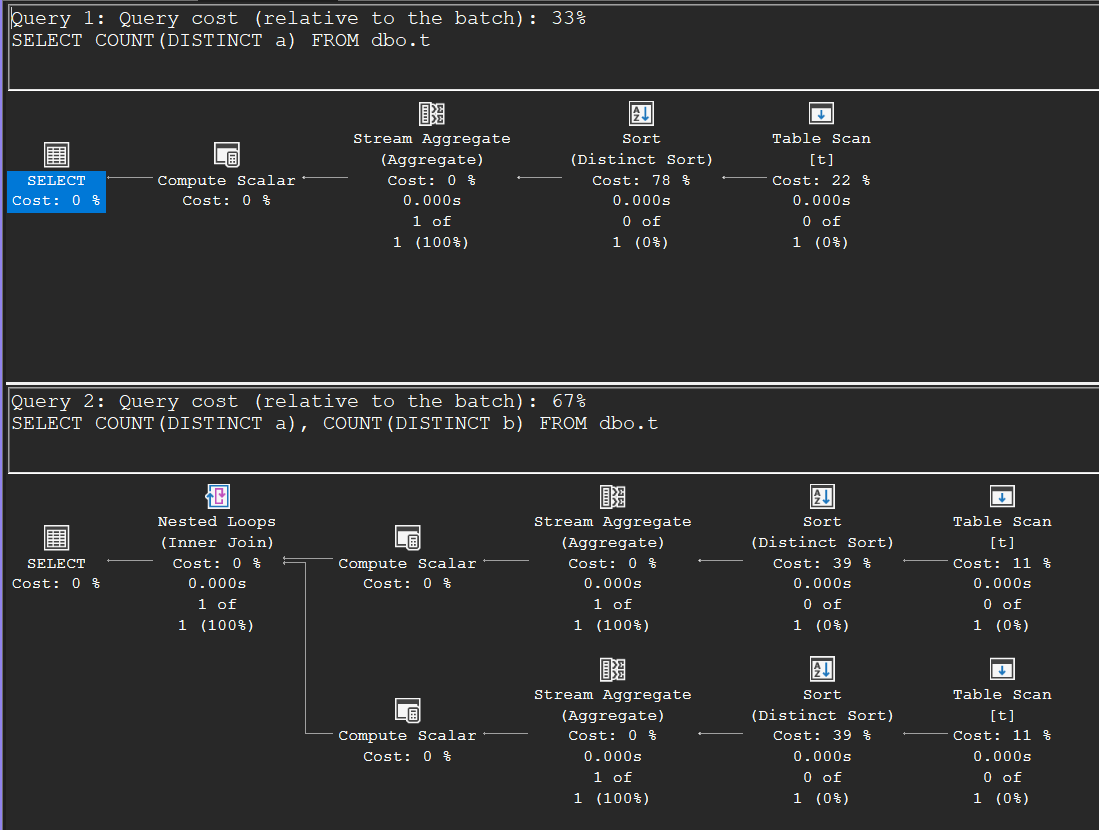
17. Stream Aggregate (September 13, 2006)
With a GROUP BY, SQL Server has two physical operators to choose from, and this article covers the first. Stream Aggregate depends on input sorted by the grouping columns (from an index or an explicit Sort): sorted input means all rows of a group are adjacent, so the operator just accumulates until the group value changes, emits the result, and resets. It reads one row at a time, keeps only one group in flight, and — importantly — preserves the sort order, so a matching ORDER BY comes for free.
Craig also shows that SELECT DISTINCT is just a GROUP BY on all selected columns with no aggregate functions (same plan, empty DEFINE list), and that with the right index a stream aggregate can even do the duplicate elimination for a DISTINCT aggregate — two stream aggregates stacked, the lower one deduplicating, the upper one aggregating.
18. Hash Aggregate (September 20, 2006)
The second grouping operator is Hash Aggregate (shown as Hash Match (Aggregate) in plans), and it behaves like hash join’s sibling: no sort order needed or preserved, memory-consuming, and blocking. It builds a hash table with one entry per group, which gives it a memory profile that surprises people: the grant is proportional to the number of output groups, not input rows. Lots of duplicates — a problem for hash join — are great for hash aggregate, since they collapse into a single entry. Run out of memory and it spills partitions to tempdb, including partially aggregated results, then finishes them one partition at a time (the SQL Profiler “Hash Warning” event — today the spill warning in the plan — tells you when that happens).
The examples map out when the optimizer flips between the two: small input → Sort + Stream Aggregate; more rows and groups → Hash Aggregate; an ORDER BY pulls it back to a stream aggregate — until the table gets so big that hashing 10,000 rows down to 100 groups and sorting those is cheaper than sorting everything. The ORDER GROUP and HASH GROUP hints let you force either strategy for experimentation.
Here is that whole progression in one screenshot (the Table Insert plans in between are just the data loads). The same GROUP BY query goes from Sort + Stream Aggregate at 100 rows, to Hash Match (Aggregate) at 1,000 rows, to hash-first-sort-later at 10,000 rows with an ORDER BY — aggregating 10,000 rows down to 100 groups and sorting those is cheaper than sorting everything up front:
TRUNCATE TABLE dbo.t;
INSERT dbo.t SELECT value % 10, value, value * 3 FROM GENERATE_SERIES(0, 99);
SELECT SUM(b) FROM dbo.t GROUP BY a;

TRUNCATE TABLE dbo.t;
INSERT dbo.t SELECT value % 100, value, value * 3 FROM GENERATE_SERIES(0, 999);
SELECT SUM(b) FROM dbo.t GROUP BY a;

TRUNCATE TABLE dbo.t;
INSERT dbo.t SELECT value % 100, value, value * 3 FROM GENERATE_SERIES(0, 9999);
SELECT SUM(b) FROM dbo.t GROUP BY a ORDER BY a;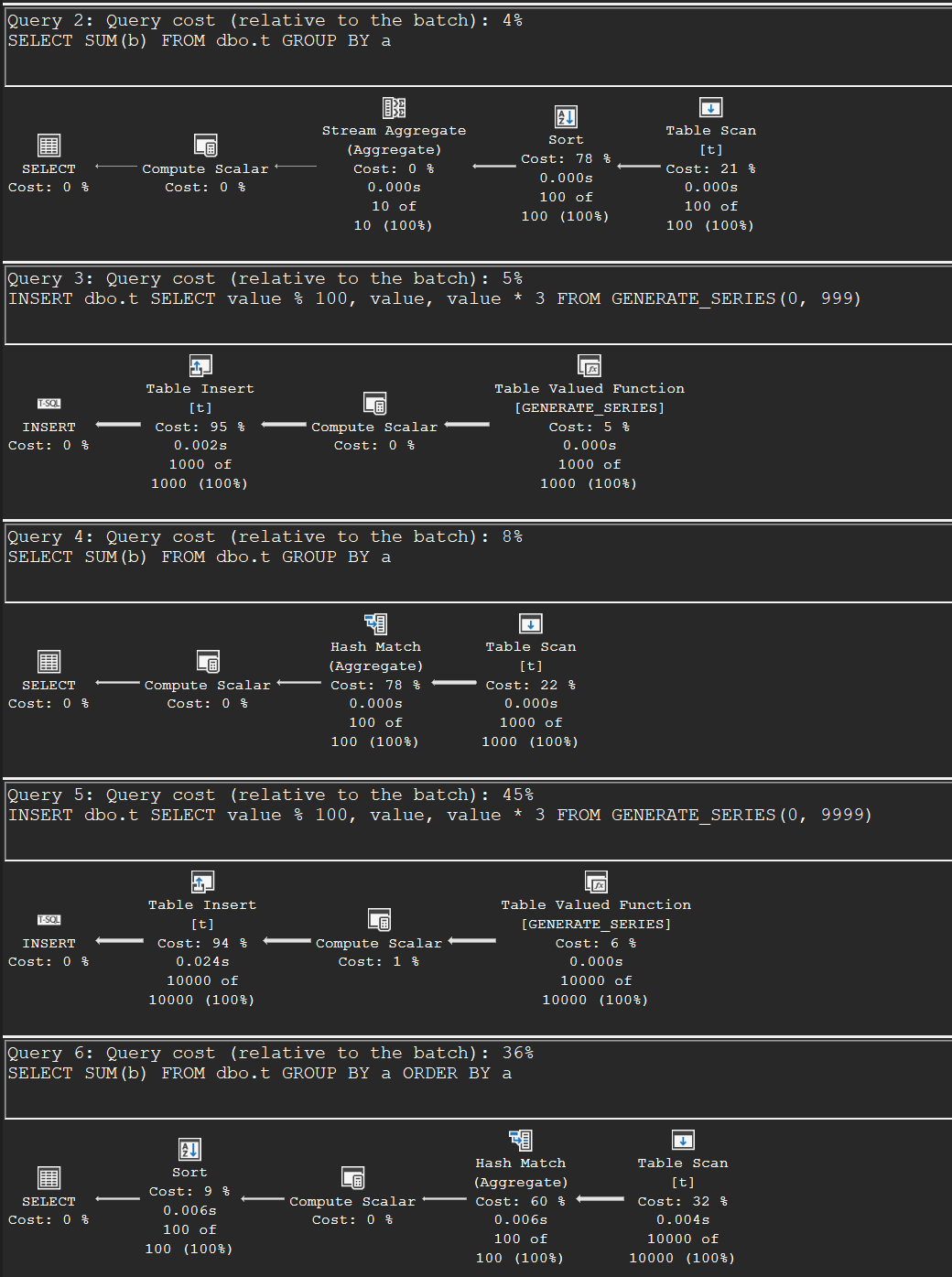
19. Scalar Subqueries (September 27, 2006)
A scalar subquery must return at most one row — and this article shows how the engine enforces that. With an aggregate in the subquery, the guarantee is free. Without one, the plan grows a Stream Aggregate that counts the subquery rows plus an Assert operator that raises error 512 (“Subquery returned more than 1 value”) when the count exceeds one, using an internal ANY aggregate to carry the value along. Assert is the same operator that enforces CHECK and foreign key constraints and the CTE recursion limit.
The enforcement machinery, visible on two plain two-column tables — Stream Aggregate counting the subquery’s rows, Assert ready to raise error 512, all wrapped in a nested loops join:
SELECT * FROM dbo.S1
WHERE S1.a = (SELECT S2.a FROM dbo.S2 WHERE S2.b = S1.b);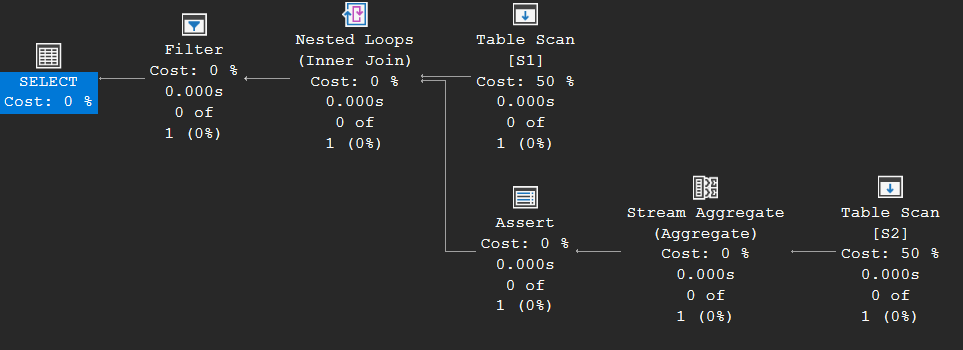
The performance angle: the Assert itself is cheap, but it pins the optimizer to one join shape — nested loops, with the subquery on the inner side, in a fixed order. Two escapes: create a unique index that proves the subquery is single-row (the Assert disappears and the join becomes freely reorderable), or rewrite the scalar comparison as IN or EXISTS, which turns it into a semi-join with all join types available. Craig’s closing advice is straightforwardly practical: if a scalar subquery performs badly, reach for a unique index or a rewrite before anything else.
And the escape in action: after creating a unique index on S2(b), the exact same query compiles to a plain nested loops join with a Clustered Index Seek — the Stream Aggregate and Assert have vanished, because the index proves the subquery can never return two rows:
CREATE UNIQUE CLUSTERED INDEX S2b ON dbo.S2 (b);
SELECT * FROM dbo.S1
WHERE S1.a = (SELECT S2.a FROM dbo.S2 WHERE S2.b = S1.b);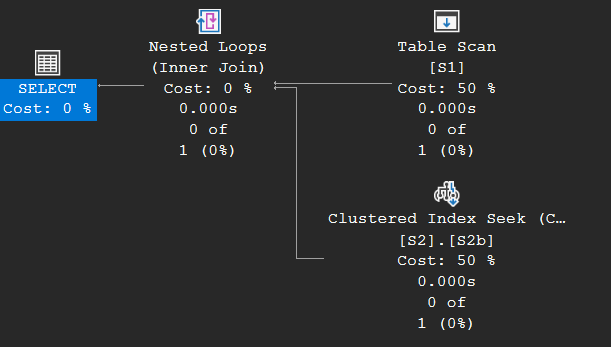
Done experimenting? This removes everything the setup created:
-- Cleanup
DROP TABLE IF EXISTS dbo.t, dbo.S1, dbo.S2;