

The tenth and final part of my series on Craig Freedman’s SQL Server query-processing blog (part 9, 2008, is here). Craig’s posting slowed down in 2009 — seven more articles followed, heavy on I/O performance and hint pitfalls, before the blog went quiet after January 2010. As always: summaries in my own words.
All plan screenshots in this post are my own, made in SSMS with “Include Actual Execution Plan” (Ctrl+M). Want to follow along? Run this one-time setup in a scratch database (it uses GENERATE_SERIES, so SQL Server 2022 or later) — cleanup at the bottom. Note the scale disclaimer: Craig’s I/O experiments used a 25.6-million-row, 3 GB table; this 2-million-row version (~300 MB) shows the plan shapes, but not his timings:
-- One-time setup for the examples in this post
CREATE TABLE dbo.IOT (
    PK INT IDENTITY PRIMARY KEY,
    RandKey INT,
    Data INT,
    Pad CHAR(100)
);
INSERT dbo.IOT (RandKey, Data, Pad)
SELECT ABS(CHECKSUM(NEWID())) % 1000000000, 1, ''
FROM GENERATE_SERIES(1, 2000000);
CREATE INDEX IRandKey ON dbo.IOT (RandKey);

CREATE TABLE dbo.H1 (A INT, B INT);
CREATE TABLE dbo.H2 (A INT, B INT);

CREATE TABLE dbo.W1 (A INT, B CHAR(8000));
CREATE TABLE dbo.W2 (A INT, B CHAR(8000));Optimizing I/O Performance by Sorting – Part 1 (February 25, 2009)
Between “few rows: seek + lookup” and “many rows: just scan” there is a middle ground where SQL Server does something clever: it keeps the non-clustered index seek, but sorts the qualifying rows on the clustering key before doing the lookups — turning a storm of random I/Os into one sequential pass over the base table. On his 25.6-million-row test table with a random key column, the plan flips through all three shapes purely on the selectivity of the predicate. You get the selectivity of the seek with the I/O pattern of the scan.
An honest confession from trying to reproduce this: on my 2-million-row version only two of the three shapes appear. The tiny range gives the classic seek + Key Lookup, but the middle range already tips straight over into the Clustered Index Scan — at this table size the optimizer never finds the window where sorting the lookups pays off (Craig’s 25.6M-row table is 13 times bigger, and the tipping points scale with it). The plan shapes at both ends are still exactly his:
SELECT SUM(Data) FROM dbo.IOT WHERE RandKey < 1000;
SELECT SUM(Data) FROM dbo.IOT WHERE RandKey < 50000000;
SELECT SUM(Data) FROM dbo.IOT WHERE RandKey < 500000000;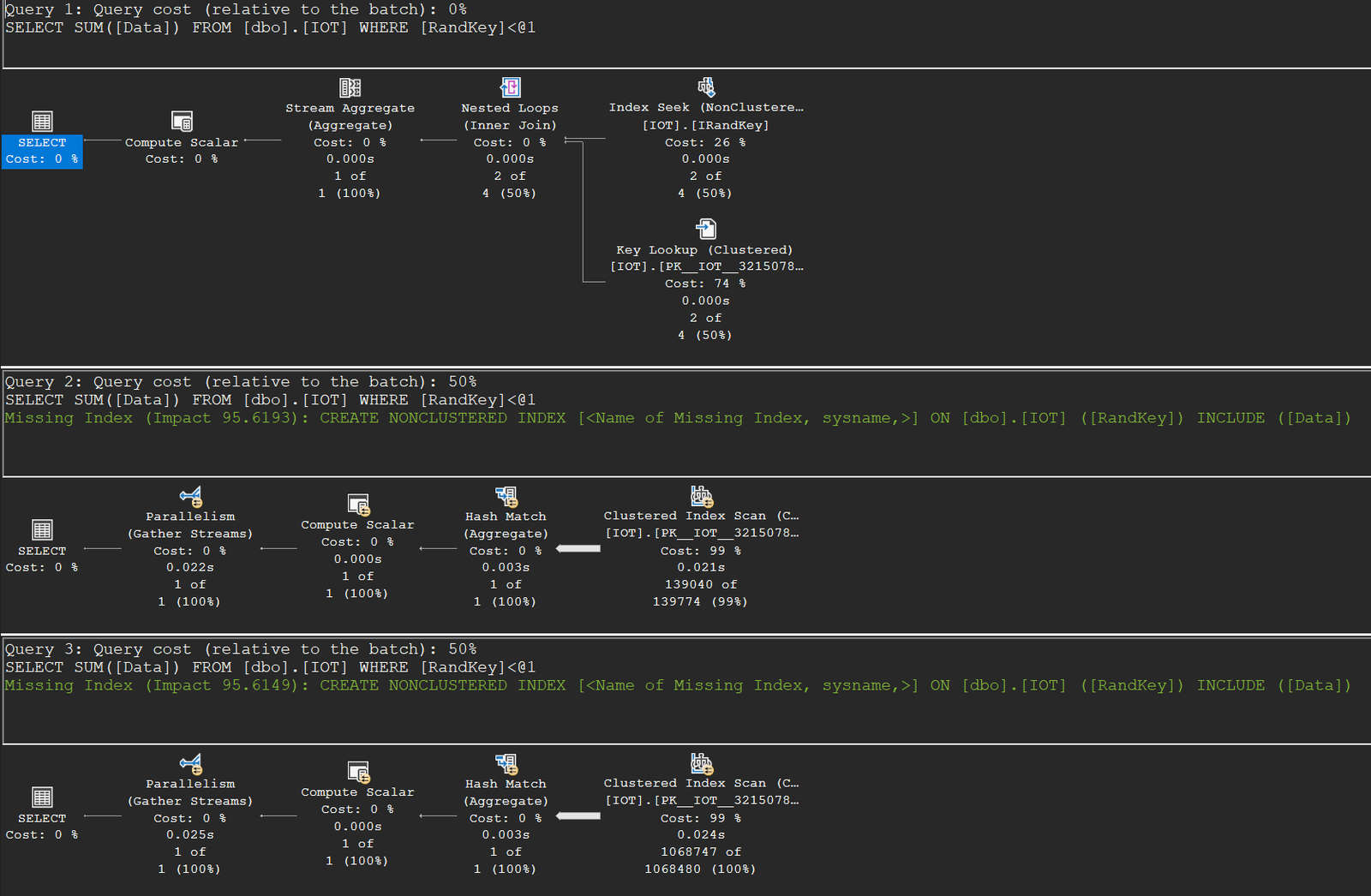
Optimizing I/O Performance by Sorting – Part 2 (March 4, 2009)
The proof, with numbers. By capping server memory at 1 GB, flushing the buffer pool, and using an UPDATE STATISTICS trick to force the same plan without the sort, Craig isolates exactly what the sort is worth: at 0.2% of rows the sorted plan ran 91 seconds versus 352 without; at 0.4% it was 97 versus 654 — up to 7x faster. Even better, doubling the rows barely moved the sorted plan’s time (sequential I/O passes the disk once either way) while the unsorted plan’s time doubled with the row count. Random versus sequential I/O, quantified.
OPTIMIZED Nested Loops Joins (March 18, 2009)
Ever noticed the OPTIMIZED keyword on a nested loops join? It’s a safety net: a best-effort, partial reordering of the outer rows — not a full sort — that the optimizer adds when it expects few rows but wants insurance against a cardinality misestimate. Craig manufactures such a misestimate with bitwise flag predicates (always true, but estimated as very selective) and measures the insurance payout: at 10% of the table, 10.4 minutes with the optimization versus 4.3 hours without; at 25%, 11.3 minutes versus 10.6 hours. A footnote worth remembering whenever you’re tempted to filter on expressions the optimizer can’t estimate.
The plan pane won’t show you the keyword — it looks like an ordinary seek-plus-lookup join. Run the tiny-range query, click the Nested Loops operator and look for the Optimized property in the Properties window (F4); that’s where the safety net hides:
SELECT SUM(Data) FROM dbo.IOT WHERE RandKey < 1000;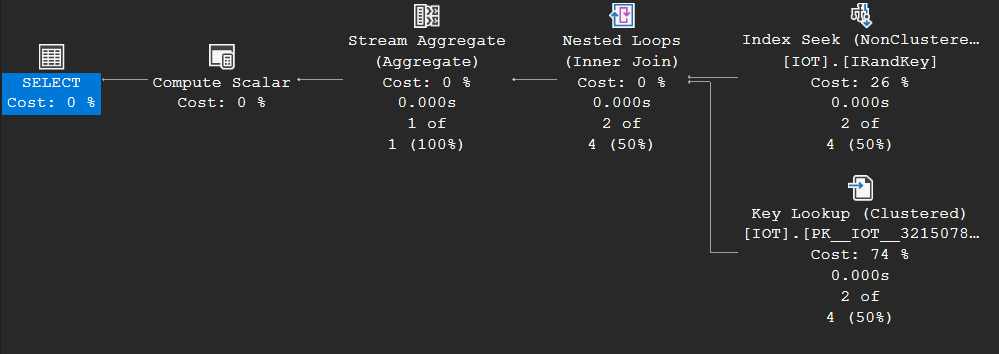
Implied Predicates and Query Hints (April 28, 2009)
A three-feature collision, from a reader question. Given ON T1.A = T2.A WHERE T1.A = 0, the optimizer derives T2.A = 0 (good — earlier filtering) and then discards the now-redundant join predicate (also good — less work). But that discarded predicate was the only equijoin predicate, and hash and merge joins require one — so OPTION (HASH JOIN) suddenly fails with error 8622. Add the (since removed) SQL 2008 RTM behavior of substituting constants under OPTION (RECOMPILE), and a stored procedure could work with EXEC MY_SP 0, 1 and fail with EXEC MY_SP 0, 0 — BETWEEN with equal bounds collapses to the fatal equality. Hints are powerful and brittle.
Time has partly healed this one: on my SQL Server 2022 instance error 8622 no longer fires — all three statements compile, including the hinted hash join on WHERE H1.A = 0. The optimizer still derives the implied H2.A = 0 predicate (third plan: a plain nested loops join over two filtered scans, no equijoin needed), but it no longer discards the join predicate so thoroughly that the hint becomes unsatisfiable. The lesson about hints stands — this exact repro just needs an older version:
SELECT * FROM dbo.H1 JOIN dbo.H2 ON H1.A = H2.A WHERE H1.B = 0 OPTION (HASH JOIN);
SELECT * FROM dbo.H1 JOIN dbo.H2 ON H1.A = H2.A WHERE H1.A = 0 OPTION (HASH JOIN);
SELECT * FROM dbo.H1 JOIN dbo.H2 ON H1.A = H2.A WHERE H1.A = 0;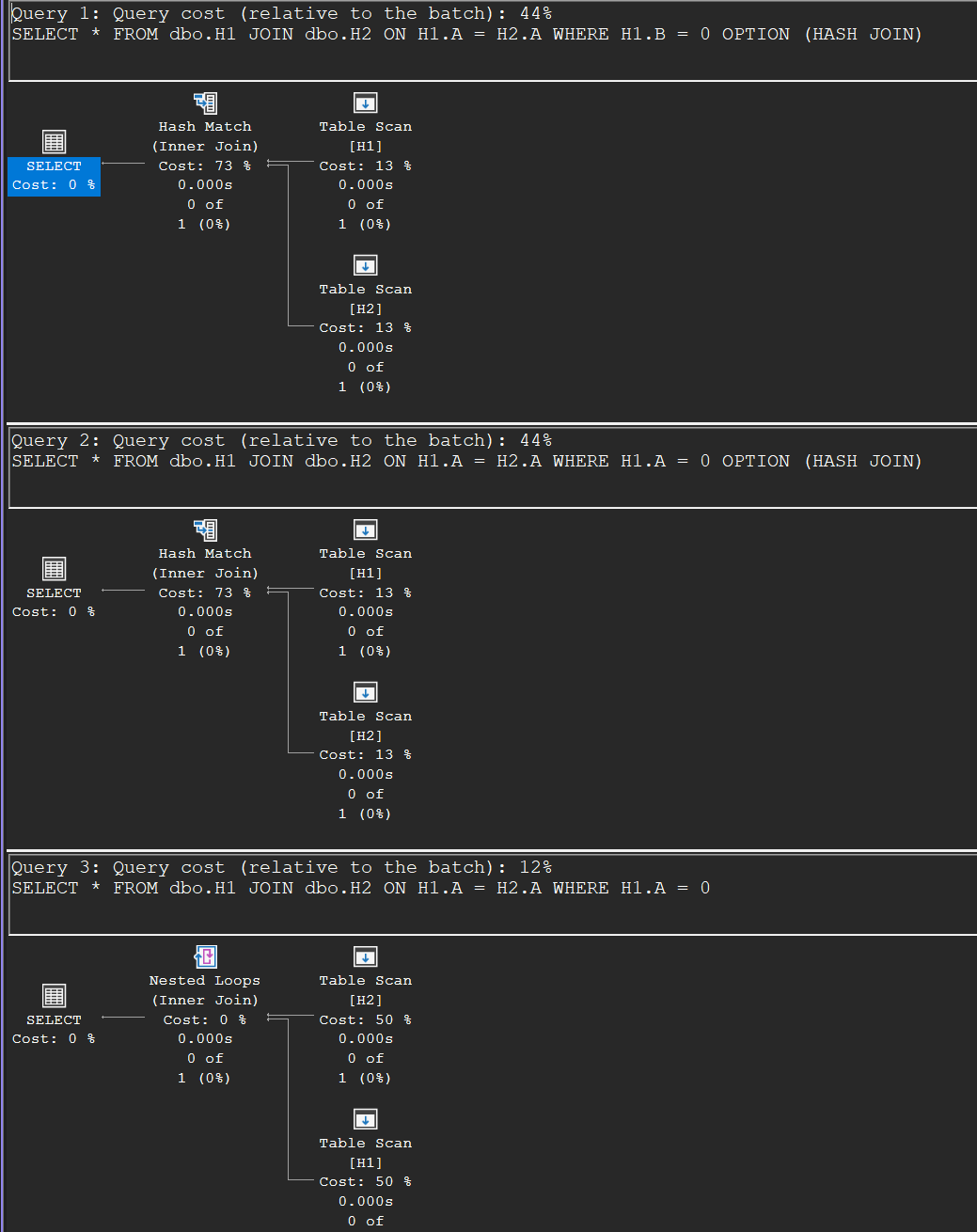
Maximum Row Size and Query Hints (June 24, 2009)
Another way a hint can break a working query: worktables obey the 8060-byte row limit. A join of two tables with CHAR(8000) columns works fine — until you force a hash join plus an ORDER BY, because the post-join sort needs a worktable holding both wide columns, which can’t exist (error 8618). Same story forcing two hash joins in a three-table join: the intermediate result is too wide to become a build input. The optimizer knew why it picked the merge join; the fix is dropping the hint (or moving to VARCHAR).
This one still reproduces perfectly in 2026. Without the ORDER BY, the forced hash join compiles fine:
SELECT * FROM dbo.W1 JOIN dbo.W2 ON W1.A = W2.A OPTION (HASH JOIN);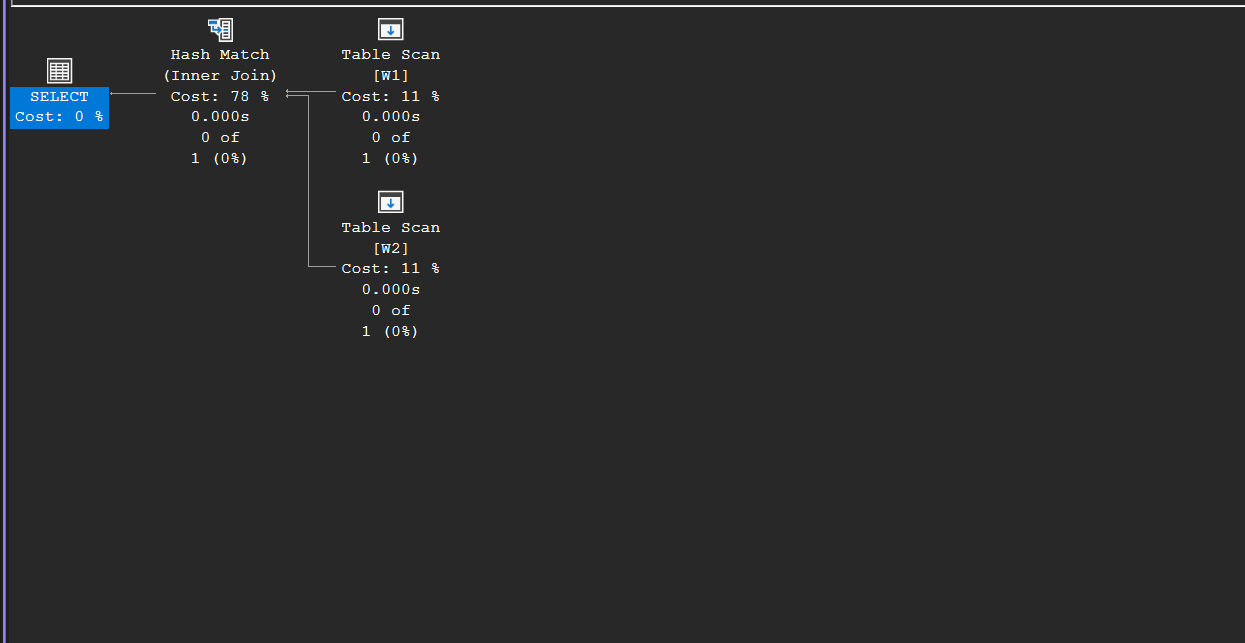
Add the ORDER BY and there is no plan left to show — only the error, straight from the Messages tab:
SELECT * FROM dbo.W1 JOIN dbo.W2 ON W1.A = W2.A ORDER BY W1.A OPTION (HASH JOIN);
Correction to my prior post on sys.dm_db_index_operational_stats (July 29, 2009)
Rare and admirable: a full post to correct one paragraph. A reader showed that sys.dm_db_index_operational_stats does not report all indexes — only those currently in the metadata cache. Restart the server, detach/attach a database, or hit memory pressure, and rows disappear and counters silently reset to zero (merely compiling a query brings the table back). Practical consequence: this DMV cannot prove an index was never used — treat its history as volatile.
More on Implicit Conversions (January 20, 2010)
The final technical post, answering a reader: which side of a mismatched comparison gets converted? SQL Server ranks all types and always converts the lower-ranked side up — never both sides to a third type. The ranking tries to minimize loss, but can’t always (INT↔REAL loses either way), and string-versus-number comparisons always convert the string to the number, which is why '+1' = 1 is true as numbers but '+1' = '1' is false as strings — and why such comparisons can simply blow up on non-numeric data. His parting advice doubles as a fitting last line for the whole blog: keep your types matched, for correctness and for performance.
The whole argument fits in one result grid — same values, opposite verdicts, decided purely by which side gets converted:
DECLARE @a INT = 1;
DECLARE @b CHAR(4) = @a;
SELECT @a AS a, @b AS b,
  CASE WHEN @a = '1'  THEN 'True' ELSE 'False' END AS [a = '1'],
  CASE WHEN @a = '+1' THEN 'True' ELSE 'False' END AS [a = '+1'],
  CASE WHEN @b = '1'  THEN 'True' ELSE 'False' END AS [b = '1'],
  CASE WHEN @b = '+1' THEN 'True' ELSE 'False' END AS [b = '+1'];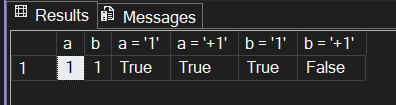
Done experimenting? This removes everything the setup created:
-- Cleanup
DROP TABLE IF EXISTS dbo.IOT, dbo.H1, dbo.H2, dbo.W1, dbo.W2;The end of the series
That’s the complete archive: 2006 through 2010, roughly a hundred articles, covered in ten parts on this site (part 1 has the full introduction). What strikes me after working through all of it is how little has aged. Iterators, seeks and scans, the three joins, memory grants and spills, Halloween protection, partition elimination, read ahead and prefetching — it’s all still exactly how the engine works, and Craig explained it from the inside with runnable examples and honest measurements. If these summaries got you curious, his originals are worth every minute — and category Craig Freedman on this site now gives you the guided tour.