

Part 9 of my series on Craig Freedman’s SQL Server query-processing blog (part 8, 2007, is here). In 2008 Craig published 16 articles: deeper update internals, the ranking functions, a three-part warning about conversions, the reworked partitioning in SQL Server 2008, and the I/O mechanics behind read ahead and prefetching. As before: one short summary per article, in my own words.
All plan screenshots in this post are my own, made in SSMS with “Include Actual Execution Plan” (Ctrl+M). Want to follow along? Run this one-time setup in a scratch database (it uses GENERATE_SERIES, so SQL Server 2022 or later) — the cleanup is at the bottom of the post:
-- One-time setup for the examples in this post
CREATE TABLE dbo.PA (A INT, B INT IDENTITY, C INT);
CREATE CLUSTERED INDEX PAA ON dbo.PA (A);

CREATE TABLE dbo.T_SRC (A INT, B INT);
CREATE TABLE dbo.T_DST (A INT, B INT);
CREATE UNIQUE CLUSTERED INDEX T_DST_A ON dbo.T_DST (A) WITH (IGNORE_DUP_KEY = ON);
CREATE UNIQUE INDEX T_DST_B ON dbo.T_DST (B) WITH (IGNORE_DUP_KEY = ON);

CREATE TABLE dbo.HP (PK INT, A INT);
CREATE UNIQUE CLUSTERED INDEX HPPK ON dbo.HP (PK);
CREATE INDEX HPA ON dbo.HP (A);
INSERT dbo.HP VALUES (1, 1), (2, 2), (3, 3);

CREATE TABLE dbo.RK (PK INT IDENTITY PRIMARY KEY, A INT, B INT);
INSERT dbo.RK VALUES (0,1),(0,1),(0,3),(0,3),(1,0),(1,0),(0,2),(0,2);

CREATE TABLE dbo.CV1 (C INT);
CREATE UNIQUE CLUSTERED INDEX CV1C ON dbo.CV1 (C);
INSERT dbo.CV1 VALUES (1000000000), (1000000001);

CREATE TABLE dbo.CV2 (A INT, B1 INT, B2 INT);
CREATE TABLE dbo.CV3 (A INT, B INT);

CREATE PARTITION FUNCTION pf2 (INT) AS RANGE FOR VALUES (0, 10, 100);
CREATE PARTITION SCHEME ps2 AS PARTITION pf2 ALL TO ([PRIMARY]);
CREATE TABLE dbo.pt2 (A INT, B INT) ON ps2 (A);
CREATE CLUSTERED INDEX pt2A ON dbo.pt2 (A) ON ps2 (A);
INSERT dbo.pt2 SELECT value, value FROM GENERATE_SERIES(-50, 149);Aggregation and update internals (January – February 2008)
Partial Aggregation (Jan 18) — How parallel aggregation avoids dragging every row through an exchange: each thread computes a local (partial) aggregate, only the per-thread results cross the exchange, and a global aggregate combines them (a COUNT becomes a SUM of counts). The optimizer uses it for few large groups, skips it for many small ones — and a partial hash aggregate has a special safety valve: minimal memory grant, and instead of spilling it just stops aggregating and passes rows through, since the global aggregate will fix everything anyway.
You can see the point of the technique without loading a single row, using the UPDATE STATISTICS trick from last part to fake a million-row table: the plan goes parallel, the aggregation happens below the Gather Streams, and only one row per thread crosses the exchange instead of a million (my SQL Server 2022 run compiles it as a Hash Match aggregate where Craig shows a Stream Aggregate pair — same idea):
UPDATE STATISTICS dbo.PA WITH ROWCOUNT = 1000000, PAGECOUNT = 100000;

SELECT COUNT(*) FROM dbo.PA OPTION (RECOMPILE);
Maintaining Unique Indexes with IGNORE_DUP_KEY (Jan 30) — On a clustered index this option is nearly free: try the insert, turn a duplicate error into a warning, discard the row. But on a non-clustered index that trick would desynchronize the indexes, so the plan grows real machinery: a probe semi-join with Assert to detect duplicates already in the index, plus a sort/segment/segment-top combo to weed duplicates within the insert stream — measurably slower. Also good to know: IGNORE_DUP_KEY only softens inserts; updates that create duplicates still fail.
All that machinery appears for a simple INSERT ... SELECT, even on empty tables — reading right to left: the probe semi-join against the non-clustered index with its Assert, then the Sort / Segment / Top combo that weeds duplicates within the insert stream, and finally the insert itself:
INSERT dbo.T_DST SELECT * FROM dbo.T_SRC;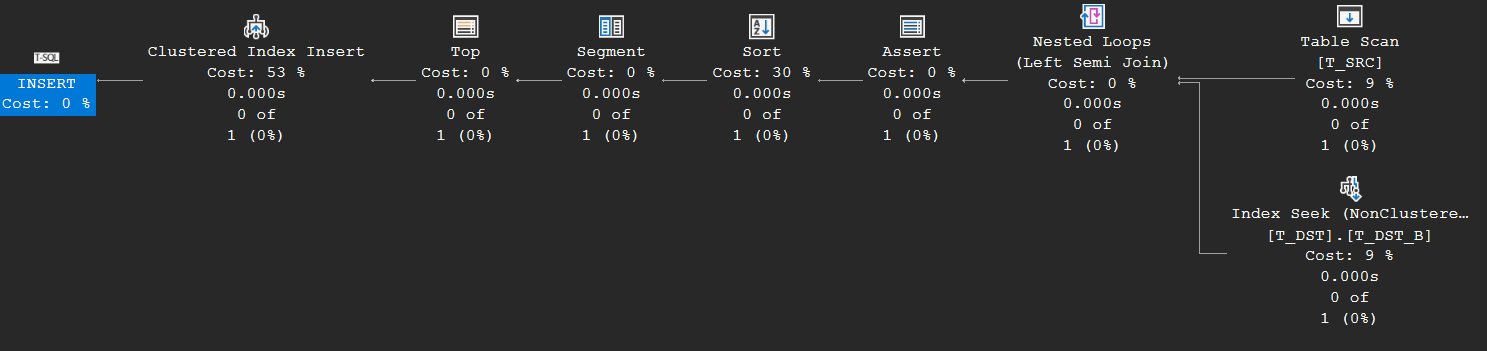
Halloween Protection (Feb 27) — The classic problem (discovered at IBM on a Halloween, hence the name): an update must not see its own writes, or a scan can meet the same row again and update it twice. SQL Server adds a blocking operator (usually an eager spool) between read and write cursor — but only when needed, e.g. when the update modifies the very index it scans. His dynamic-cursor demo of what would happen without protection literally loops forever, and his timing test puts a number on the cost: the forced-spool plan ran over 30% slower. If the plan already blocks somewhere (a sort from unique-index maintenance), no extra spool is added.
“Only when needed” in one screenshot: the same update twice, once read via the clustered index (no protection necessary — A + 10 doesn’t touch HPPK), once forced to read via the very index being updated — and there’s the Eager Table Spool, buffering all rows before any write happens:
UPDATE dbo.HP SET A = A + 10;
UPDATE dbo.HP SET A = A + 10 FROM dbo.HP WITH (INDEX (HPA));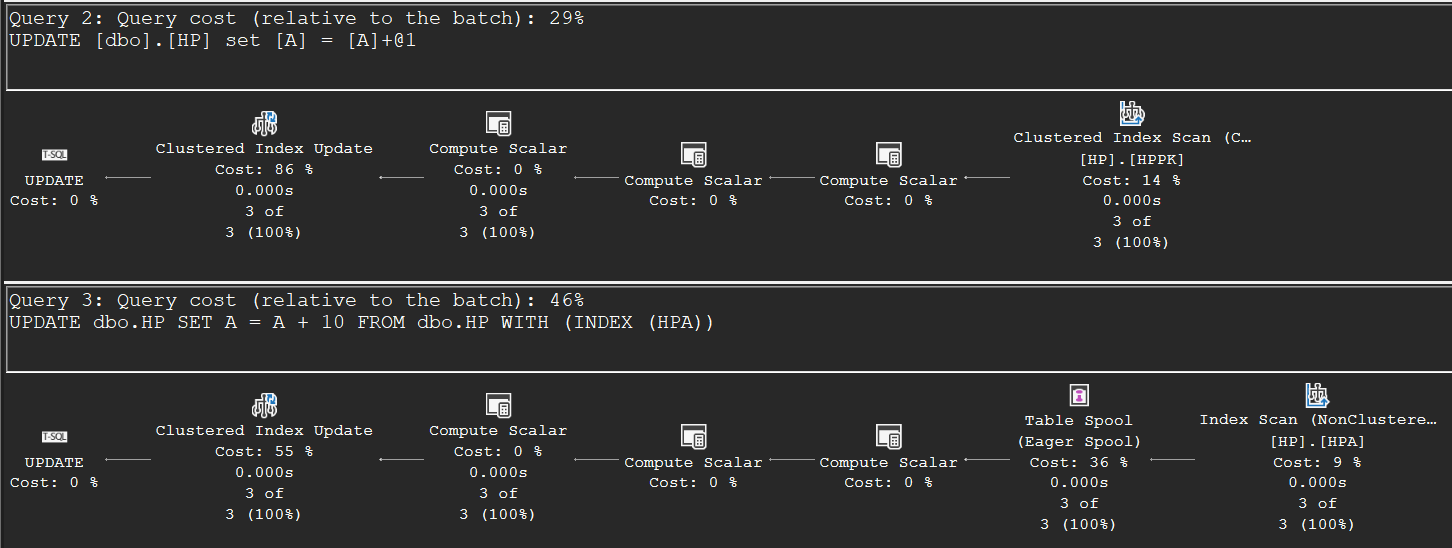
Ranking functions (March 2008)
Ranking Functions: ROW_NUMBER (Mar 19) — The plan pattern behind every ranking function: Sort (or a suitable index), Segment to mark partition boundaries, Sequence Project to hand out the numbers. Two practical lessons: each different OVER(ORDER BY …) stacks another sort onto the plan, only one of which can come from an index — and the textual order of the ranking functions in your SELECT can decide whether the final ORDER BY needs an extra sort or comes for free.
Ranking Functions: RANK, DENSE_RANK, and NTILE (Mar 31) — RANK and DENSE_RANK are ROW_NUMBER plus one extra Segment that detects ties; all three can share a single Sequence Project. NTILE is the interesting one: it needs the partition’s row count first, which introduces the segment spool — buffer a group, count it, then replay the group and attach the count to every row. That’s also exactly how window aggregates like COUNT(*) OVER (PARTITION BY ...) execute, years before window functions became mainstream.
Both patterns on an eight-row table: the shared pipeline (Sort, two stacked Segments, one Sequence Project computing all three functions), and below it the NTILE plan with the segment spool — Table Spools buffering each partition, a Stream Aggregate counting it, and a Nested Loops join replaying the rows with their count attached:
SELECT *, ROW_NUMBER() OVER (ORDER BY B) AS rn,
          RANK()       OVER (ORDER BY B) AS rnk,
          DENSE_RANK() OVER (ORDER BY B) AS drnk
FROM dbo.RK;

SELECT *, NTILE(2) OVER (PARTITION BY A ORDER BY B) AS nt
FROM dbo.RK;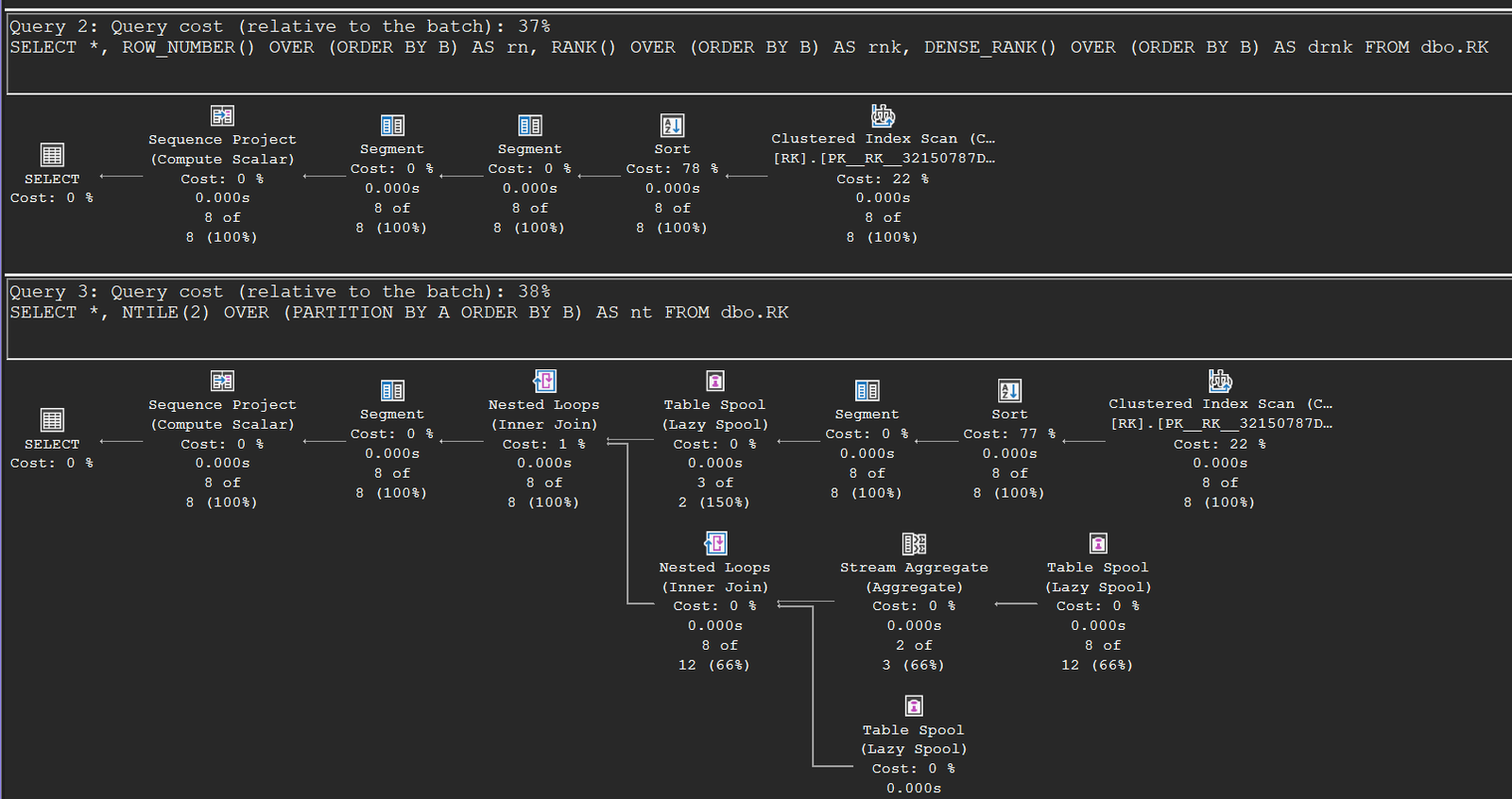
Conversions, three warnings (April – June 2008)
Conversion and Arithmetic Errors (Apr 28) — Whether CONVERT(INT, badstring) in a join query fails depends on plan shape: the optimizer may push the conversion below the join (where it runs on rows that would never have joined), while deferred scalar evaluation can save you in a loop join and not in a hash join, because the hash join must materialize the value into its hash table. The reliable fix is guarding the expression yourself with CASE/PATINDEX — or NULLIF for divide-by-zero.
Conversion and Arithmetic Errors: Change between SQL Server 2000 and 2005 (May 6) — A reader noticed the same query survived on SQL Server 2000: it placed the conversion above the join. The 2005 behavior is a documented trade-off — pushing expressions down enables computed-column index matching and can avoid recomputation, at the price of occasionally failing on rows that would have been filtered.
Implicit Conversions (Jun 5) — Mix data types and SQL Server converts the lower-precedence side, sometimes lossily. Comparing an INT index to a REAL parameter forces a conversion on the column, killing the direct seek; the engine compensates with GetRangeThroughConvert, seeking a computed range and re-checking the residual predicate (SQL 2000 did this with a cruder ±1 range that could even miss rows). His loop-join benchmark makes the cost concrete: joining mismatched INT/REAL columns took more than twice as long as matched types. Moral: keep your types aligned.
The compensation machinery, live: compare an INT index to a REAL variable and the plan grows a Constant Scan and Compute Scalar — that’s where GetRangeThroughConvert computes the seek range (check the Compute Scalar’s defined values and the Seek Predicates in the properties) — driving a Nested Loops join into the range seek:
DECLARE @V REAL = 1E9;
SELECT * FROM dbo.CV1 WITH (INDEX (CV1C)) WHERE C = @V;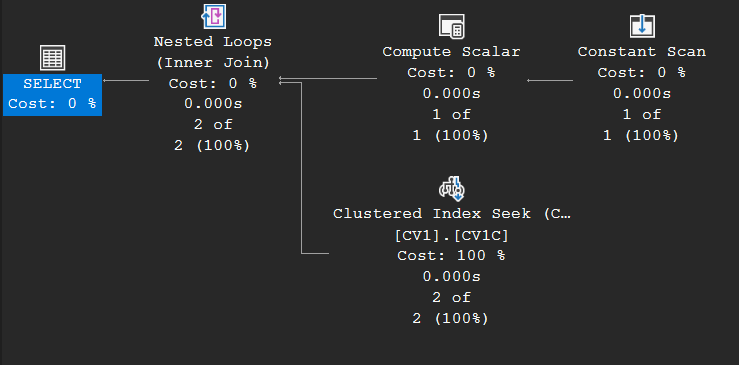
Subqueries in BETWEEN and CASE (June 2008)
Subqueries in BETWEEN and CASE Statements (Jun 27) — X BETWEEN Y AND Z is expanded to two comparisons very early in compilation, so if X is a subquery, the subquery gets duplicated and genuinely evaluated twice (the plan shows two scans, two sorts, two aggregates). The simple CASE form has the same trap, once per WHEN branch. The cure: compute the subquery once in a derived table or CROSS APPLY and compare the result.
The duplication is plainly visible even on empty tables — count the branches: two Table Scans of CV3, two Sorts, two Stream Aggregates, one for each half of the expanded BETWEEN:
SELECT * FROM dbo.CV2
WHERE (SELECT SUM(CV3.B) FROM dbo.CV3 WHERE CV3.A = CV2.A) BETWEEN CV2.B1 AND CV2.B2;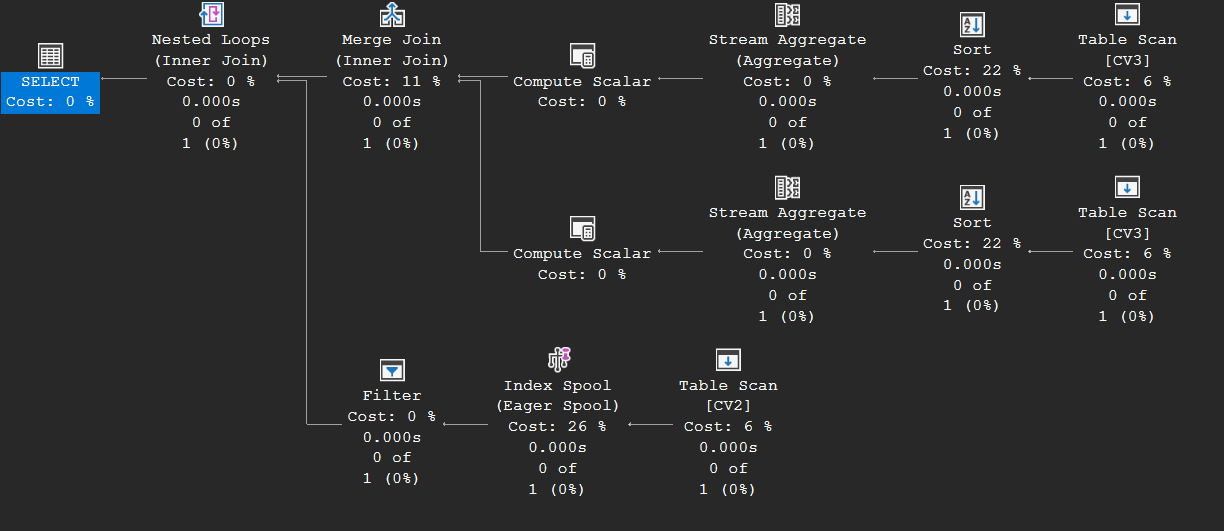
Partitioning, reworked in SQL Server 2008 (July – August 2008)
Partitioned Tables in SQL Server 2008 (Jul 15) — SQL Server 2008 dropped the Constant-Scan-plus-join scaffolding from 2005: a partitioned table is now treated as if it were indexed on a hidden leading [PtnId] column. Partition elimination becomes an ordinary seek on that column (yes, a table scan with a SEEK predicate), and the partitions actually touched show up in the actual plan’s RunTimePartitionSummary.
Compare this with the 2005-era plan in part 6: no Constant Scan, no join scaffolding — just a Clustered Index Seek whose hidden leading PtnId column does the elimination (open the properties and check the Seek Predicates and “Actual Partition Count”). Static elimination with a literal returns the 150 qualifying rows from three partitions; the variable version resolves at run time to the 50 rows of one partition:
SELECT * FROM dbo.pt2 WHERE A < 100;

DECLARE @I INT = 0;
SELECT * FROM dbo.pt2 WHERE A < @I;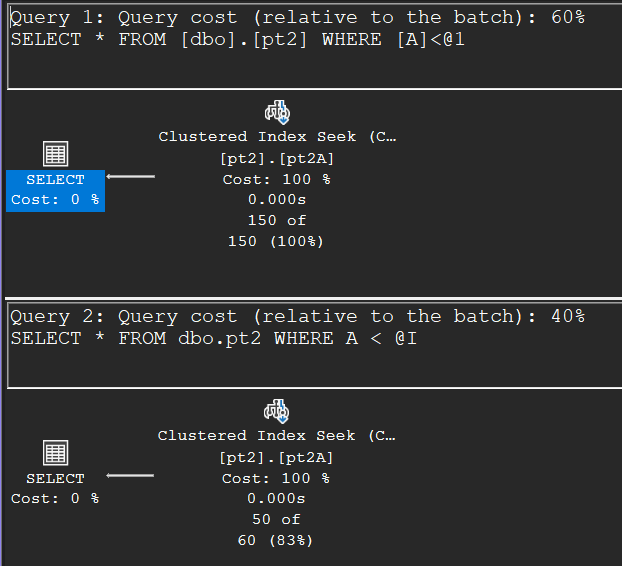
Partitioned Indexes in SQL Server 2008 (Aug 5) — A partitioned index behaves as a composite index with [PtnId] in front. Normally you can’t seek the second column without equality on the first, but partitioned tables get a special skip scan: first seek the qualifying partitions, then seek the real key within each — a true seek, not a residual filter. And when the table is partitioned on a different column than the index key, the skip scan simply spans all partitions.
Dynamic Partition Elimination Performance (Aug 22) — A reader asked what 2005’s per-partition filter really cost, so Craig measured it: at 1,000 partitions, 10,000 executions of a trivial query took ~18 seconds on 2005 versus a flat ~0.2 seconds on 2008, which seeks straight to the right partition. Perspective included: even the bad case is only 1.8 ms per query — real data processing usually dwarfs it.
I/O internals and index DMVs (September – October 2008)
Sequential Read Ahead (Sep 23) — Why asynchronous I/O exists: one CPU issuing synchronous reads keeps exactly one spindle busy. For scans, the storage engine reads ahead up to 500 pages, combining contiguous pages into large single I/Os — visible as “read-ahead reads” in STATISTICS IO. Allocation-ordered scans (heaps, or nolock scans) beat index-ordered scans on fragmented indexes, which is one more argument for defragmentation.
Random Prefetching (Oct 7) — The random-I/O counterpart: a nested loops join (including every bookmark lookup, and even updates driven by a non-clustered index) can look ahead in its outer input and issue asynchronous reads for the inner-side pages it’s about to need — the WITH UNORDERED/ORDERED PREFETCH keywords in the plan. Unordered prefetch returns rows as I/Os complete; ordered prefetch preserves order when the query needs it.
What is the difference between sys.dm_db_index_usage_stats and sys.dm_db_index_operational_stats? (Oct 30) — The distinction everyone needs once: usage_stats counts once per plan execution that references the index — even if the operator never ran; operational_stats counts what the storage engine actually did, so a bookmark lookup executed three times counts three times, and one never executed counts zero. Consequence: don’t expect them to match, and check both before dropping an “unused” index.
(2008 also included a short May 15 announcement sharing slides from a New England SQL Server Users Group talk on query processing — mentioned here for completeness.)
Done experimenting? This removes everything the setup created:
-- Cleanup
DROP TABLE IF EXISTS dbo.PA, dbo.T_SRC, dbo.T_DST, dbo.HP, dbo.RK,
                     dbo.CV1, dbo.CV2, dbo.CV3, dbo.pt2;
DROP PARTITION SCHEME ps2;
DROP PARTITION FUNCTION pf2;