

Part 8 of my series on Craig Freedman’s SQL Server query-processing blog (part 7, December 2006, is here). After a writing pause — he was busy contributing to Kalen Delaney’s Inside SQL Server 2005: Query Tuning and Optimization — Craig returned in April 2007 and produced 23 articles that year. From here on I’m covering a full year per part, grouped by theme, with a short summary per article in my own words.
All plan screenshots in this post are my own, made in SSMS with “Include Actual Execution Plan” (Ctrl+M). Want to follow along? Run this one-time setup in a scratch database (it uses GENERATE_SERIES, so SQL Server 2022 or later) — the cleanup is at the bottom of the post. The isolation-level experiments in the first section need two SSMS windows and are best re-run from Craig’s step-by-step descriptions, so those sections have no figures here:
-- One-time setup for the examples in this post
CREATE TABLE dbo.Sales (EmpId INT, Yr INT, Sales MONEY);
INSERT dbo.Sales VALUES (1,2005,12000),(1,2006,18000),(1,2007,25000),
                        (2,2005,15000),(2,2006,6000),(3,2006,20000),(3,2007,24000);

CREATE TABLE dbo.PIVOT_Sales (EmpId INT, [2005] MONEY, [2006] MONEY, [2007] MONEY);
INSERT dbo.PIVOT_Sales VALUES (1,12000,18000,25000),(2,15000,6000,NULL),(3,NULL,20000,24000);

CREATE TABLE dbo.UT (A INT, B INT);
CREATE CLUSTERED INDEX UTA ON dbo.UT (A);
INSERT dbo.UT SELECT value, value FROM GENERATE_SERIES(0, 99);

CREATE TABLE dbo.MU (PK INT PRIMARY KEY, A INT, B INT);
CREATE UNIQUE INDEX MUB ON dbo.MU (B);
INSERT dbo.MU VALUES (0, 0, 0), (1, 1, 1);

CREATE TABLE dbo.Emp (EmployeeID INT PRIMARY KEY, ManagerID INT NULL);
CREATE INDEX EmpMgr ON dbo.Emp (ManagerID);
INSERT dbo.Emp VALUES (109, NULL), (6,109),(12,109),(42,109),(140,109),
(268,42),(284,42),(288,42),(1,268),(2,268),(3,284);Isolation levels and concurrency (April – June 2007)
Read Committed Isolation Level (Apr 25) — The default isolation level takes share locks one row at a time and releases them immediately. Craig’s two-session experiment shows the consequence: while a scan is blocked mid-table, another transaction can move rows around it, so the scan can return the same row twice or miss a row entirely. Not a bug — committed data only, but no statement-level consistency.
Query Plans and Read Committed Isolation Level (May 2) — The same effect through the lens of plans: a nested loops join can see two different versions of the same customer for two orders, a full outer join (which reads each table twice) can return both a joined and a NULL-extended row for the same key, and an index-intersection plan can stitch together half-old, half-new rows that appear to violate a CHECK constraint. The row counts are consistent per index, just not across time.
Repeatable Read Isolation Level (May 9) — Repeatable read holds its S locks until the end of the transaction, so scanned rows can’t change anymore — but rows not yet reached can still move (a scan can still miss a moved row), and phantoms can still be inserted between locked rows. That phantom window is exactly the difference with serializable and its key-range locks.
Serializable vs. Snapshot Isolation Level (May 16) — Both give a read-consistent view, but pessimistically (range locks, blocking, deadlocks) versus optimistically (no read locks, update-conflict rollbacks). The unforgettable part is the marble example Jim Gray gave Craig: two transactions each flip all white marbles to black and vice versa. Under serializable you always end with one color; under snapshot both transactions work from the same snapshot and neatly swap every marble — an outcome no serial execution could produce. Snapshot is consistent, but it is not serializable.
Read Committed and Updates (May 22) — Update statements take U locks while scanning, and normally release non-qualifying rows immediately. But put a blocking operator (a sort or eager spool for Halloween protection) between the read and the write, and SQL Server suddenly holds those U locks until the end of the statement — it has to, or the buffered rows could be changed underneath the pending update. Watch sys.dm_tran_locks and the difference is plain to see.
Read Committed and Large Objects (May 31) — LOB columns (like varchar(max)) travel through blocking operators as pointers instead of copies, because copying up to 2 GB per row isn’t practical. To keep the pointers valid, S locks on the source rows stay until the statement finishes — so a harmless SELECT ... ORDER BY that returns a LOB quietly holds key locks on every row it touched.
Read Committed and Bookmark Lookup (Jun 7) — The same extended-lock behavior appears with bookmark lookups when a sort, an OPTIMIZED nested loops join, or a WITH PREFETCH join sits between the index seek and the lookup: the prefetch delay means rows would otherwise be unprotected between seek and lookup.
Query Failure with Read Uncommitted (Jun 12) — The NOLOCK finale: beyond dirty reads, a nolock scan can fail outright with error 601, “Could not continue scan with NOLOCK due to data movement”, when a row it is positioned on gets deleted mid-query. One more reason NOLOCK is not a performance hint.
PIVOT and UNPIVOT (July 2007)
The PIVOT Operator (Jul 3) — What PIVOT does and when it’s reversible: only if all input data is transformed, every output cell derives from a single input row, and the aggregate is an identity function on one value (SUM/MIN/MAX/AVG yes, COUNT no).
PIVOT Query Plans (Jul 9) — The demystifier: a PIVOT plan is nothing more than a GROUP BY with one aggregate per output column, each computed over a CASE expression that passes the value for “its” year and NULL otherwise — relying on aggregates discarding NULLs. You could write the same thing by hand with SUM(CASE…); PIVOT mainly saves typing and suppresses the NULL-elimination warning.
See for yourself — the whole PIVOT compiles to a Table Scan, a Sort and one Stream Aggregate (the CASE expressions live inside the aggregate’s DEFINE list, visible in the properties):
SELECT EmpId, [2005], [2006], [2007]
FROM (SELECT EmpId, Yr, Sales FROM dbo.Sales) AS s
PIVOT (SUM(Sales) FOR Yr IN ([2005], [2006], [2007])) AS p;
The UNPIVOT Operator (Jul 17) — The reverse direction compiles to a nested loops join against a Constant Scan that emits one row per listed column (a correlated cross apply in disguise), followed by a filter that drops the NULL cells. Watch the default output type of the name column: NVARCHAR(128), so cast it.
The disguise, unmasked in the plan — a Constant Scan producing one row per listed column (3 input rows × 3 columns = 9 rows into the join), then the Filter dropping the NULL cells back to 7:
SELECT EmpId, CAST(Yr AS INT) AS Yr, Sales
FROM (SELECT EmpId, [2005], [2006], [2007] FROM dbo.PIVOT_Sales) AS p
UNPIVOT (Sales FOR Yr IN ([2005], [2006], [2007])) AS s;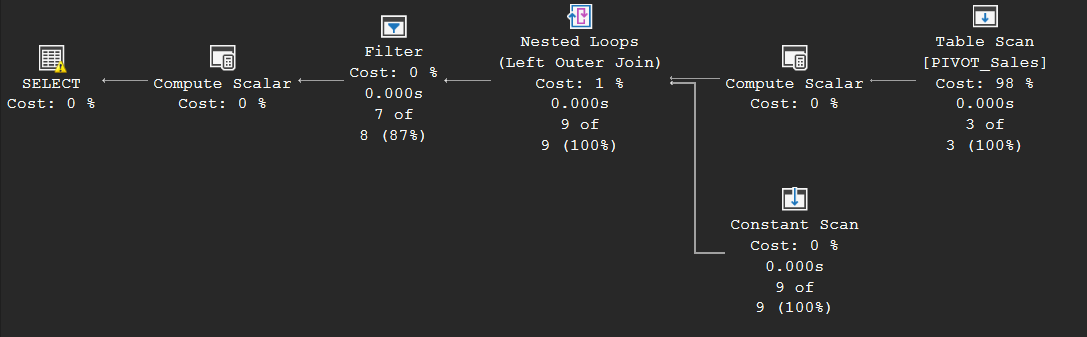
TOP (July – August 2007)
ROWCOUNT Top (Jul 25) — Why almost every insert/update/delete plan carries a Top operator: it implements SET ROWCOUNT. For selects the engine can just stop pulling rows at the root, but a complex update plan can output more rows at the root than it updates (thanks to split/collapse), so the Top must sit directly above the read to guarantee exactly N rows are changed.
More on TOP (Aug 1) — The useful details: a “top sort” needs far less memory than a full sort because it only tracks the top N rows; TOP ... PERCENT must count all rows first (eager spool) and is therefore inherently more expensive; WITH TIES reads one row beyond N to detect the ties and rules out the top-sort optimization; and the optimizer replaces TOP 0 with a Constant Scan and deletes TOP 100 PERCENT from the plan entirely — but only for constants.
All three variants on one 100-row table: the Top N Sort, the Eager Spool that PERCENT drags in to count everything first, and the WITH TIES plan whose Sort feeds 6 rows to the Top — that sixth row is the tie detector at work:
SELECT TOP 5 *           FROM dbo.UT ORDER BY B;
SELECT TOP 5 PERCENT *   FROM dbo.UT;
SELECT TOP 5 WITH TIES * FROM dbo.UT ORDER BY B;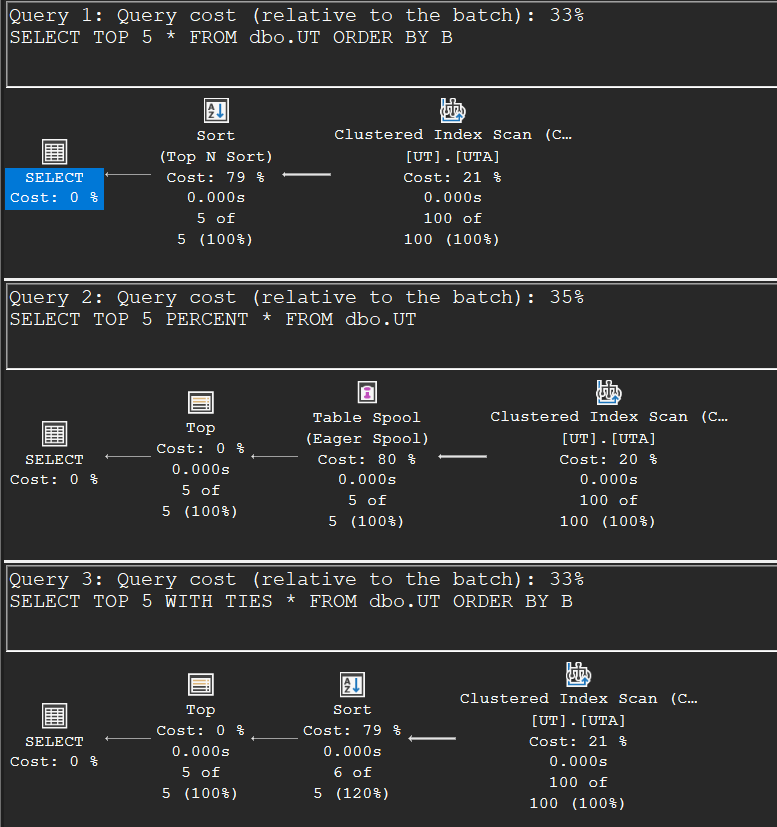
Update plans and index maintenance (August – September 2007)
Optimized Non-clustered Index Maintenance (Aug 15) — Every DML plan is a read cursor plus a write cursor, and since SQL Server 2005 the plan computes per row whether each non-clustered index actually changes — unchanged indexes aren’t touched at all. Craig proves it three ways: sys.dm_db_index_operational_stats, the locks held, and STATISTICS IO (10 logical reads for a real change, 2 for a no-op update of the same values).
Optimized Non-clustered Index Maintenance in Per-Index Plans (Aug 22) — The same optimization in wide (per-index) update plans, where each index gets its own update operator fed by a common-subexpression spool: filters on the computed “did it change” flags sit in front of each index update, and on a repeat of the identical update both index updates process zero rows. Also a nice trick in passing: faking a huge table with UPDATE STATISTICS ... WITH ROWCOUNT, PAGECOUNT to coax the optimizer into a wide plan.
Maintaining Unique Indexes (Sep 6) — Updating the key of a unique index row-by-row could hit “false” uniqueness violations (swap two values and whichever you update first collides). The engine solves it with the split/sort/collapse trio: split updates into delete+insert pairs, sort them by the index key with deletes first, and collapse matching pairs back into updates of the non-key columns. Single-row updates skip the machinery; MERGE statements get it more often than you’d like.
The whole trio in one plan — swap the two values of unique-indexed column B and read the top row from right to left: after the clustered index update, a Split turns the 2 updates into 4 delete/insert halves, the Filter and Sort line them up deletes-first, and the Collapse merges them back into 2 changes for the non-clustered index update:
UPDATE dbo.MU SET B = 1 - B;
Multi-level aggregation: ROLLUP, CUBE and GROUPING SETS (September – October 2007)
Aggregation WITH ROLLUP (Sep 21) — ROLLUP computes the group-by result plus running subtotals along the column order, in a single scan: a normal aggregate feeding a special rollup stream aggregate that maintains the running totals and emits the NULL-marked total rows (tell them apart from real NULLs with GROUPING()). The rollup aggregate is always a stream aggregate and never parallel.
Aggregation WITH CUBE (Sep 27) — CUBE = all possible subtotal combinations, and the plan is honest about it: it computes the ROLLUP part and UNION ALLs the missing dimension totals, replaying the pre-aggregated input from a common-subexpression spool. Bonus: combining CUBE with PIVOT produces the classic totals-matrix in one statement.
Both plans side by side. ROLLUP: one scan, one sort, two stacked Stream Aggregates producing 11 rows (6 groups + 4 subtotals + 1 grand total). CUBE: the same rollup branch plus a second branch for the missing per-year totals, glued together by a Concatenation into 14 rows:
SELECT EmpId, Yr, SUM(Sales) FROM dbo.Sales GROUP BY ROLLUP (EmpId, Yr);
SELECT EmpId, Yr, SUM(Sales) FROM dbo.Sales GROUP BY CUBE (EmpId, Yr);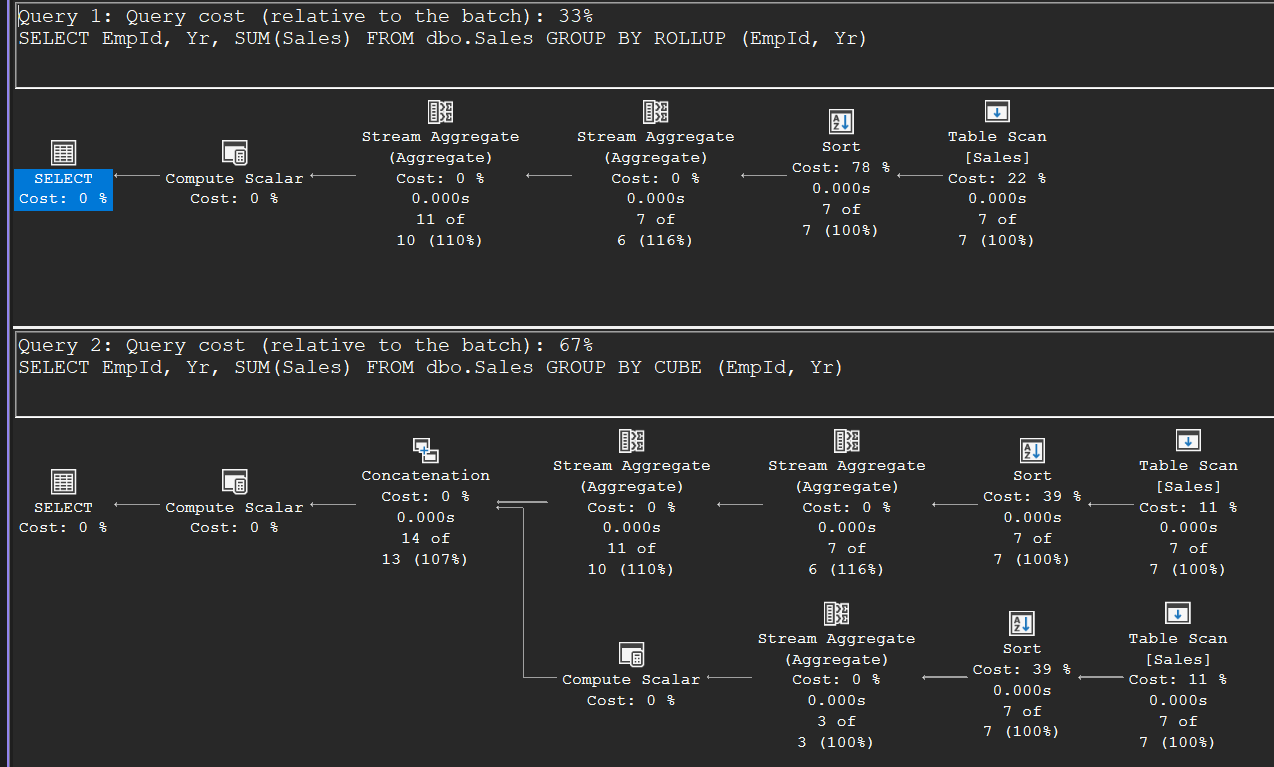
GROUPING SETS in SQL Server 2008 (Oct 11) — The ANSI syntax that makes ROLLUP and CUBE mere shorthands: specify exactly which aggregation levels you want — partial rollups, skipped levels, even unrelated dimensions in one query — with () as the grand total. Parenthesis placement matters a lot, and ROLLUP/CUBE can be nested inside a grouping set for higher-dimensional schemas.
CTEs and recursion (October – November 2007)
CTEs (Common Table Expressions) (Oct 18) — The essential fact people still get wrong: a CTE is expanded inline, not materialized. Reference it twice and the plan computes it twice. Materializing into a temp table or table variable is sometimes faster, sometimes slower — the inline expansion lets the optimizer push predicates into the CTE, as his single-employee example shows nicely.
Recursive CTEs (Oct 25) — Anatomy of every recursive plan: anchor and recursive branches glued by a Concatenation, plus the stack spool — a lazy spool whose secondary side pops the last row and deletes it, giving depth-first traversal. An Assert guards the recursion depth (default 100, tunable with MAXRECURSION).
The full anatomy on a small self-contained hierarchy (no AdventureWorks needed): anchor seek and recursive branch meeting in the Concatenation, the Index Spool (with the STACK keyword in its properties) at the root, the Table Spool replaying the previous level, and the Assert watching the depth:
WITH DirectReports (ManagerID, EmployeeID, EmployeeLevel) AS (
    SELECT ManagerID, EmployeeID, 0
    FROM dbo.Emp WHERE ManagerID IS NULL
    UNION ALL
    SELECT e.ManagerID, e.EmployeeID, d.EmployeeLevel + 1
    FROM dbo.Emp AS e
    JOIN DirectReports AS d ON e.ManagerID = d.EmployeeID
)
SELECT ManagerID, EmployeeID, EmployeeLevel FROM DirectReports;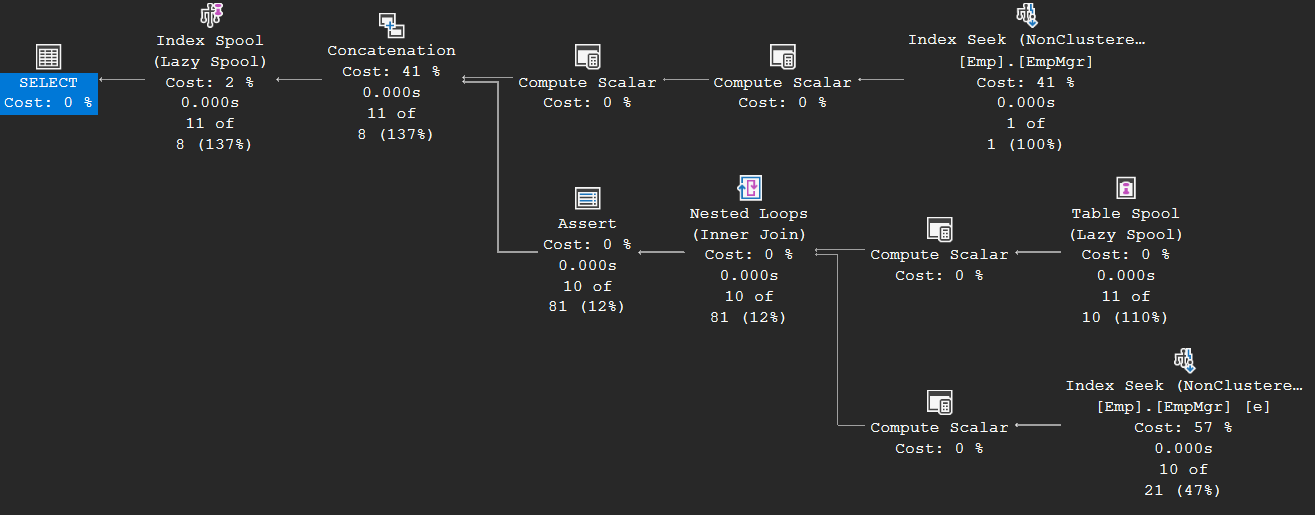
Recursive CTEs continued (Nov 7) — Two consequences of that plan shape: recursive queries never go parallel (stack spools and inner sides of nested loops joins don’t), and where you put the level filter matters enormously. Filtering on level outside the CTE computes the entire hierarchy first and discards it; moving the predicate into the recursive member stops the recursion early — same results, a fraction of the rows.
Compare the row counts in the two plans: filtering outside the CTE walks all 11 rows of the hierarchy and throws 6 away in a Filter at the very end; filtering inside the recursive member never descends below level 1 — the recursive branch produces 4 rows instead of 10:
WITH DirectReports (ManagerID, EmployeeID, EmployeeLevel) AS (
    SELECT ManagerID, EmployeeID, 0 FROM dbo.Emp WHERE ManagerID IS NULL
    UNION ALL
    SELECT e.ManagerID, e.EmployeeID, d.EmployeeLevel + 1
    FROM dbo.Emp AS e JOIN DirectReports AS d ON e.ManagerID = d.EmployeeID
)
SELECT * FROM DirectReports WHERE EmployeeLevel <= 1;

WITH DirectReports (ManagerID, EmployeeID, EmployeeLevel) AS (
    SELECT ManagerID, EmployeeID, 0 FROM dbo.Emp WHERE ManagerID IS NULL
    UNION ALL
    SELECT e.ManagerID, e.EmployeeID, d.EmployeeLevel + 1
    FROM dbo.Emp AS e JOIN DirectReports AS d ON e.ManagerID = d.EmployeeID
    WHERE d.EmployeeLevel < 1
)
SELECT * FROM DirectReports;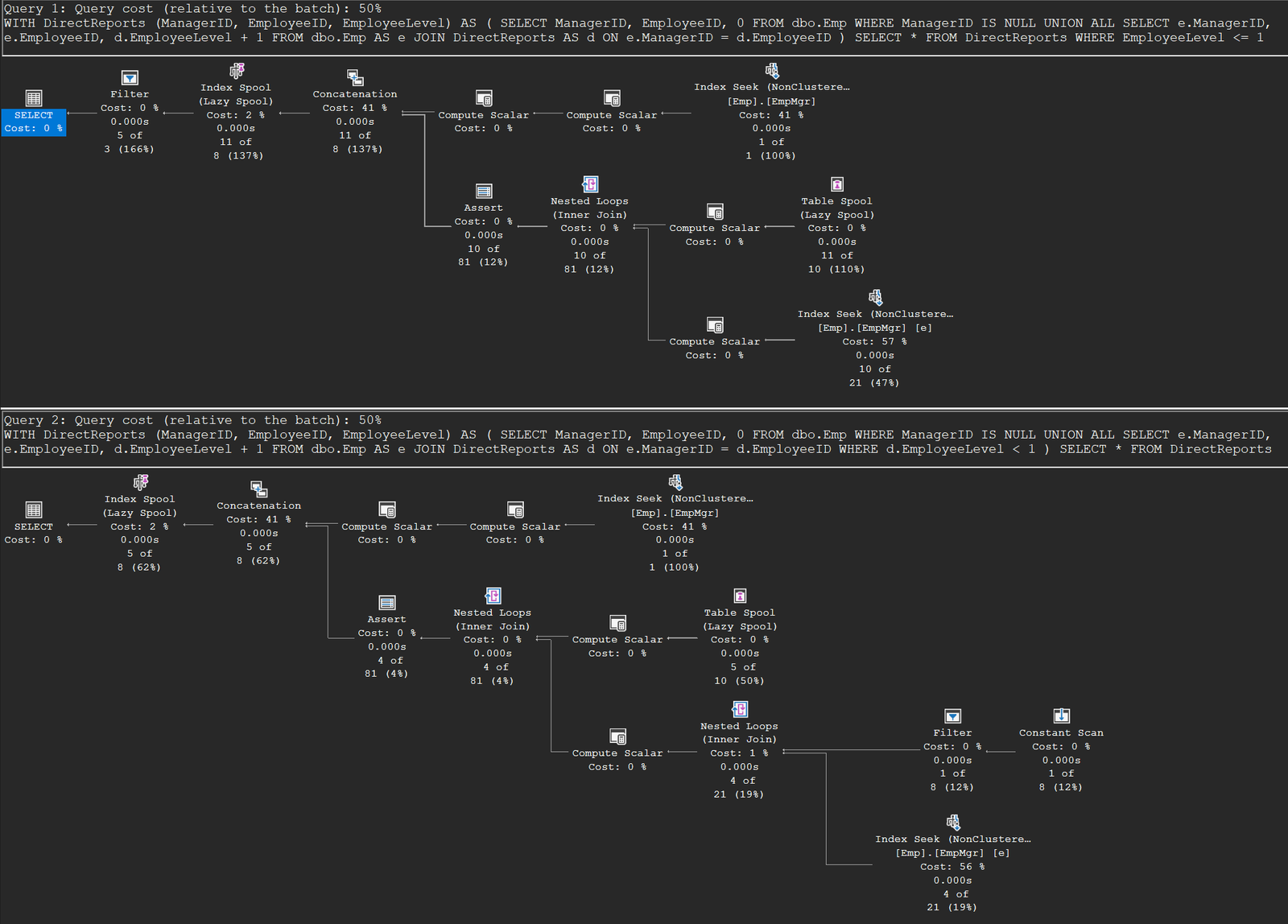
One editorial note: the archive also carries a short April 17 announcement post (“Parallel Query Execution Presentation”) sharing slides from a user group talk — I’ve folded it into this intro rather than giving it its own section.
Done experimenting? This removes everything the setup created:
-- Cleanup
DROP TABLE IF EXISTS dbo.Sales, dbo.PIVOT_Sales, dbo.UT, dbo.MU, dbo.Emp;