

This week I worked an IoT table with partitioning to make data movement simpel and without locking.
But what about the other way around… you have a huge table and want to make it partitioned, how can you do that?
Well Michael J. Swart wrote a post about it “Partitioning a huge table quickly, without a size-of-data operation.”
Check it here: https://michaeljswart.com/2026/08/partitioning-a-huge-table-quickly/
And the trick is to make an empty partition function, can you do that?
Yes you can, why? no checking.
-- ---------------------------------------------------------------------
-- Step 1 - create the partition function/scheme with NO boundaries yet
-- ---------------------------------------------------------------------
CREATE PARTITION FUNCTION PF_MonthlySlidingWindow (DATETIME2)
AS RANGE RIGHT
FOR VALUES
(
    /* no partition boundaries to start with */
);After you ran the script the data is in a ‘history’ partition.
UPDATE dbo.HumongousTable
SET LogDate = DATEADD(SECOND, Id * -1, LogDate);
Use Kendra Little’s partition helper views, see https://kendralittle.com/topics/partitioning/
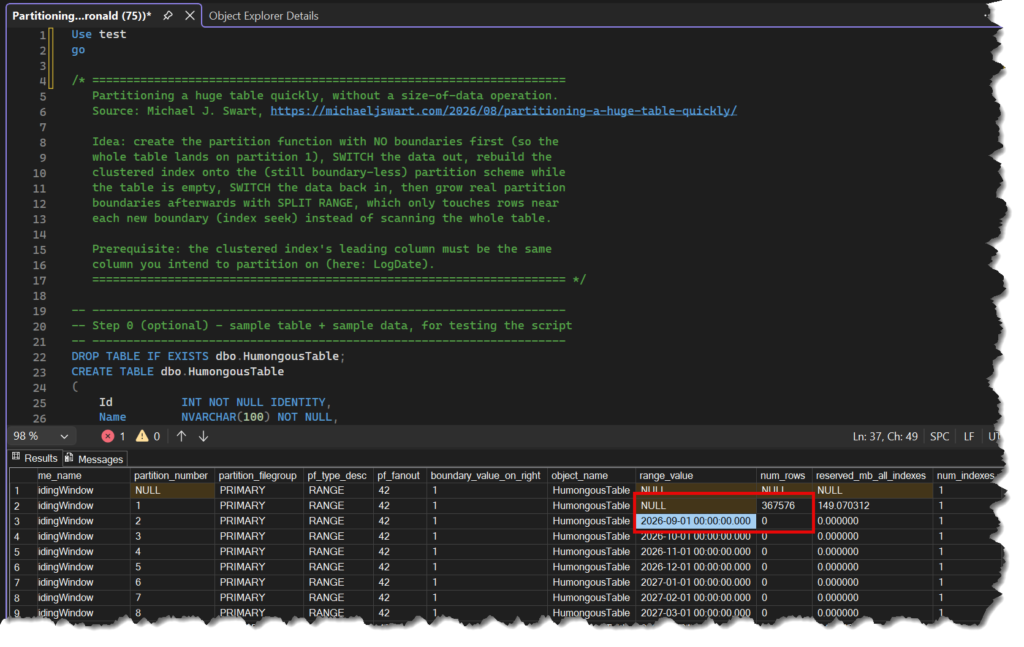
Let’s change history to future..
set statistics time on
UPDATE dbo.HumongousTable
SET LogDate = DATEADD(HOUR, Id * +1, LogDate);
set statistics time offThis can be painful.
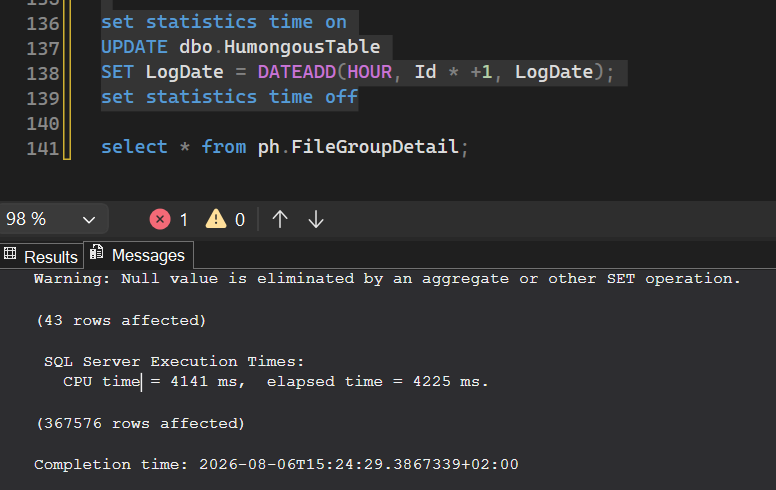
Data movement in a way we do not want.
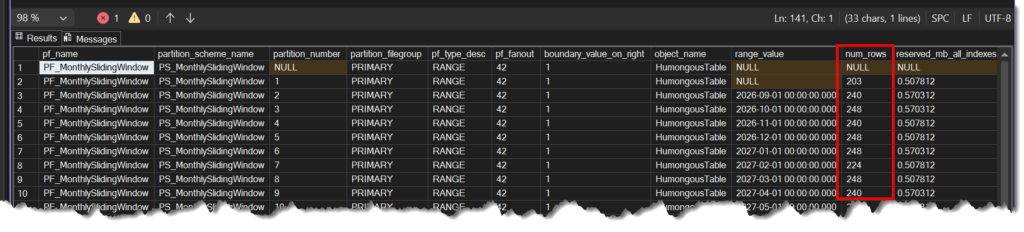
Now if you want to move the data between those partition ranges, be aware this can be very slow. (Perhaps it is even faster to BCP it out and in).
I thinks it fully logged and mostly large volumes of data, so be aware of this!
/* =====================================================================
Partitioning a huge table quickly, without a size-of-data operation.
Source: Michael J. Swart, https://michaeljswart.com/2026/08/partitioning-a-huge-table-quickly/
Idea: create the partition function with NO boundaries first (so the
whole table lands on partition 1), SWITCH the data out, rebuild the
clustered index onto the (still boundary-less) partition scheme while
the table is empty, SWITCH the data back in, then grow real partition
boundaries afterwards with SPLIT RANGE, which only touches rows near
each new boundary (index seek) instead of scanning the whole table.
Prerequisite: the clustered index's leading column must be the same
column you intend to partition on (here: LogDate).
===================================================================== */
-- ---------------------------------------------------------------------
-- Step 0 (optional) - sample table + sample data, for testing the script
-- ---------------------------------------------------------------------
DROP TABLE IF EXISTS dbo.HumongousTable;
CREATE TABLE dbo.HumongousTable
(
Id INT NOT NULL IDENTITY,
Name NVARCHAR(100) NOT NULL,
Description NVARCHAR(500) NULL,
LogDate DATETIME2 NOT NULL,
CONSTRAINT PK_HumungousTable UNIQUE CLUSTERED (LogDate, Id)
);
INSERT dbo.HumongousTable (Name, Description, LogDate)
SELECT CAST(text AS NVARCHAR(100)), CAST(text AS NVARCHAR(500)), GETUTCDATE()
FROM sys.messages;
UPDATE dbo.HumongousTable
SET LogDate = DATEADD(SECOND, Id * -1, LogDate);
-- ---------------------------------------------------------------------
-- Step 1 - create the partition function/scheme with NO boundaries yet
-- ---------------------------------------------------------------------
CREATE PARTITION FUNCTION PF_MonthlySlidingWindow (DATETIME2)
AS RANGE RIGHT
FOR VALUES
(
    /* no partition boundaries to start with */
);
CREATE PARTITION SCHEME PS_MonthlySlidingWindow
AS PARTITION PF_MonthlySlidingWindow
ALL TO ([PRIMARY]);
-- ---------------------------------------------------------------------
-- Step 2 - create a matching staging table (same schema, same clustered key)
-- ---------------------------------------------------------------------
CREATE TABLE dbo.HumongousTable_Temp
(
Id INT NOT NULL IDENTITY,
Name NVARCHAR(100) NOT NULL,
Description NVARCHAR(500) NULL,
LogDate DATETIME2 NOT NULL,
CONSTRAINT PK_HumungousTable_Temp UNIQUE CLUSTERED (LogDate, Id)
);
-- ---------------------------------------------------------------------
-- Step 3 - SWITCH the data out to the staging table (metadata-only, instant)
-- ---------------------------------------------------------------------
ALTER TABLE dbo.HumongousTable
SWITCH TO dbo.HumongousTable_Temp;
-- ---------------------------------------------------------------------
-- Step 4 - rebuild the clustered index onto the partition scheme while
-- HumongousTable is empty, so this is cheap regardless of the
-- real data volume
-- ---------------------------------------------------------------------
CREATE UNIQUE CLUSTERED INDEX PK_HumongousTable
ON dbo.HumongousTable (LogDate, Id)
-- WITH (DROP_EXISTING = ON)
ON PS_MonthlySlidingWindow (LogDate);
-- ---------------------------------------------------------------------
-- Step 5 - SWITCH the data back in (metadata-only again). All rows now
-- sit on partition 1 of the properly partition-scheme-backed
-- clustered index - no scan required to get here.
-- ---------------------------------------------------------------------
ALTER TABLE dbo.HumongousTable_Temp
SWITCH TO dbo.HumongousTable PARTITION 1;
DROP TABLE IF EXISTS dbo.HumongousTable_Temp;
-- ---------------------------------------------------------------------
-- Step 6 - grow real partition boundaries by splitting. Each SPLIT RANGE
-- is NOT metadata-only, but because the clustered index's
-- leading column (LogDate) matches the partitioning column, it
-- can seek to the boundary via the index instead of scanning
-- the whole table.
-- ---------------------------------------------------------------------
DECLARE @Month DATETIME2 = DATEFROMPARTS(YEAR(GETDATE()), MONTH(GETDATE()), 1);
WHILE @Month < '20300101'
BEGIN
SET @Month = DATEADD(MONTH, 1, @Month);
ALTER PARTITION FUNCTION PF_MonthlySlidingWindow() SPLIT RANGE (@Month);
ALTER PARTITION SCHEME PS_MonthlySlidingWindow NEXT USED [PRIMARY];
END
-- ---------------------------------------------------------------------
-- Step 7 - verify
-- ---------------------------------------------------------------------
SELECT COUNT(*) AS NumberOfPartitions
FROM sys.partitions
WHERE object_id = OBJECT_ID('dbo.HumongousTable');
select * from ph.FileGroupDetail;
select * from [dbo].[HumongousTable];
CREATE PARTITION FUNCTION [PF_MonthlySlidingWindow](datetime2(7)) AS RANGE RIGHT
FOR VALUES (N'2026-09-01T00:00:00.000', N'2026-10-01T00:00:00.000', N'2026-11-01T00:00:00.000',
N'2026-12-01T00:00:00.000', N'2027-01-01T00:00:00.000', N'2027-02-01T00:00:00.000',
N'2027-03-01T00:00:00.000', N'2027-04-01T00:00:00.000', N'2027-05-01T00:00:00.000', N'2027-06-01T00:00:00.000',
N'2027-07-01T00:00:00.000', N'2027-08-01T00:00:00.000', N'2027-09-01T00:00:00.000', N'2027-10-01T00:00:00.000',
N'2027-11-01T00:00:00.000', N'2027-12-01T00:00:00.000', N'2028-01-01T00:00:00.000', N'2028-02-01T00:00:00.000',
N'2028-03-01T00:00:00.000', N'2028-04-01T00:00:00.000', N'2028-05-01T00:00:00.000', N'2028-06-01T00:00:00.000',
N'2028-07-01T00:00:00.000', N'2028-08-01T00:00:00.000', N'2028-09-01T00:00:00.000', N'2028-10-01T00:00:00.000',
N'2028-11-01T00:00:00.000', N'2028-12-01T00:00:00.000', N'2029-01-01T00:00:00.000', N'2029-02-01T00:00:00.000',
N'2029-03-01T00:00:00.000', N'2029-04-01T00:00:00.000', N'2029-05-01T00:00:00.000', N'2029-06-01T00:00:00.000',
N'2029-07-01T00:00:00.000', N'2029-08-01T00:00:00.000', N'2029-09-01T00:00:00.000', N'2029-10-01T00:00:00.000',
N'2029-11-01T00:00:00.000', N'2029-12-01T00:00:00.000', N'2030-01-01T00:00:00.000')
GO
select * from ph.FileGroupDetail;
set statistics time on
UPDATE dbo.HumongousTable
SET LogDate = DATEADD(HOUR, Id * +1, LogDate);
set statistics time off
select * from ph.FileGroupDetail;This from Kendra.
USE [test]
GO
/****** Object:  Schema [ph]    Script Date: 06/08/2026 17:16:43 ******/
CREATE SCHEMA [ph]
GO
/****** Object:  View [ph].[FileGroupDetail]    Script Date: 06/08/2026 17:16:43 ******/
SET ANSI_NULLS ON
GO
SET QUOTED_IDENTIFIER ON
GO


--Create a view to see partition information by filegroup
CREATE VIEW [ph].[FileGroupDetail]
AS
SELECT  pf.name AS pf_name ,
        ps.name AS partition_scheme_name ,
        p.partition_number ,
        ds.name AS partition_filegroup ,
        pf.type_desc AS pf_type_desc ,
        pf.fanout AS pf_fanout ,
        pf.boundary_value_on_right ,
        OBJECT_NAME(si.object_id) AS object_name ,
        rv.value AS range_value ,
        SUM(CASE WHEN si.index_id IN ( 1, 0 ) THEN p.rows
                    ELSE 0
            END) AS num_rows ,
        SUM(dbps.reserved_page_count) * 8 / 1024. AS reserved_mb_all_indexes ,
        SUM(CASE ISNULL(si.index_id, 0)
                WHEN 0 THEN 0
                ELSE 1
            END) AS num_indexes
FROM    sys.destination_data_spaces AS dds
        JOIN sys.data_spaces AS ds ON dds.data_space_id = ds.data_space_id
        JOIN sys.partition_schemes AS ps ON dds.partition_scheme_id = ps.data_space_id
        JOIN sys.partition_functions AS pf ON ps.function_id = pf.function_id
        LEFT JOIN sys.partition_range_values AS rv ON pf.function_id = rv.function_id
                                                        AND dds.destination_id = CASE pf.boundary_value_on_right
                                                                                    WHEN 0 THEN rv.boundary_id
                                                                                    ELSE rv.boundary_id + 1
                                                                                END
        LEFT JOIN sys.indexes AS si ON dds.partition_scheme_id = si.data_space_id
        LEFT JOIN sys.partitions AS p ON si.object_id = p.object_id
                                            AND si.index_id = p.index_id
                                            AND dds.destination_id = p.partition_number
        LEFT JOIN sys.dm_db_partition_stats AS dbps ON p.object_id = dbps.object_id
                                                        AND p.partition_id = dbps.partition_id
GROUP BY ds.name ,
        p.partition_number ,
        pf.name ,
        pf.type_desc ,
        pf.fanout ,
        pf.boundary_value_on_right ,
        ps.name ,
        si.object_id ,
        rv.value;
GO
/****** Object:  View [ph].[ObjectDetail]    Script Date: 06/08/2026 17:16:43 ******/
SET ANSI_NULLS ON
GO
SET QUOTED_IDENTIFIER ON
GO

CREATE VIEW [ph].[ObjectDetail]
AS
SELECT  SCHEMA_NAME(so.schema_id) AS schema_name ,
        OBJECT_NAME(p.object_id) AS object_name ,
        p.partition_number ,
        p.data_compression_desc ,
        dbps.row_count ,
        dbps.reserved_page_count * 8 / 1024. AS reserved_mb ,
        si.index_id ,
        CASE WHEN si.index_id = 0 THEN '(heap!)'
                ELSE si.name
        END AS index_name ,
        si.is_unique ,
        si.data_space_id ,
        mappedto.name AS mapped_to_name ,
        mappedto.type_desc AS mapped_to_type_desc ,
        partitionds.name AS partition_filegroup ,
        pf.name AS pf_name ,
        pf.type_desc AS pf_type_desc ,
        pf.fanout AS pf_fanout ,
        pf.boundary_value_on_right ,
        ps.name AS partition_scheme_name ,
        rv.value AS range_value
FROM    sys.partitions p
JOIN    sys.objects so
        ON p.object_id = so.object_id
            AND so.is_ms_shipped = 0
LEFT JOIN sys.dm_db_partition_stats AS dbps
        ON p.object_id = dbps.object_id
            AND p.partition_id = dbps.partition_id
JOIN    sys.indexes si
        ON p.object_id = si.object_id
            AND p.index_id = si.index_id
LEFT JOIN sys.data_spaces mappedto
        ON si.data_space_id = mappedto.data_space_id
LEFT JOIN sys.destination_data_spaces dds
        ON si.data_space_id = dds.partition_scheme_id
            AND p.partition_number = dds.destination_id
LEFT JOIN sys.data_spaces partitionds
        ON dds.data_space_id = partitionds.data_space_id
LEFT JOIN sys.partition_schemes AS ps
        ON dds.partition_scheme_id = ps.data_space_id
LEFT JOIN sys.partition_functions AS pf
        ON ps.function_id = pf.function_id
LEFT JOIN sys.partition_range_values AS rv
        ON pf.function_id = rv.function_id
            AND dds.destination_id = CASE pf.boundary_value_on_right
                                        WHEN 0 THEN rv.boundary_id
                                        ELSE rv.boundary_id + 1
                                    END
GO